Review
Review is a triage list. Instead of scrolling a full day on Activity, it lists only the segments of one member that fall into the cases you choose, across a day, a week or a month of history, so a manager can work through them in one sitting.
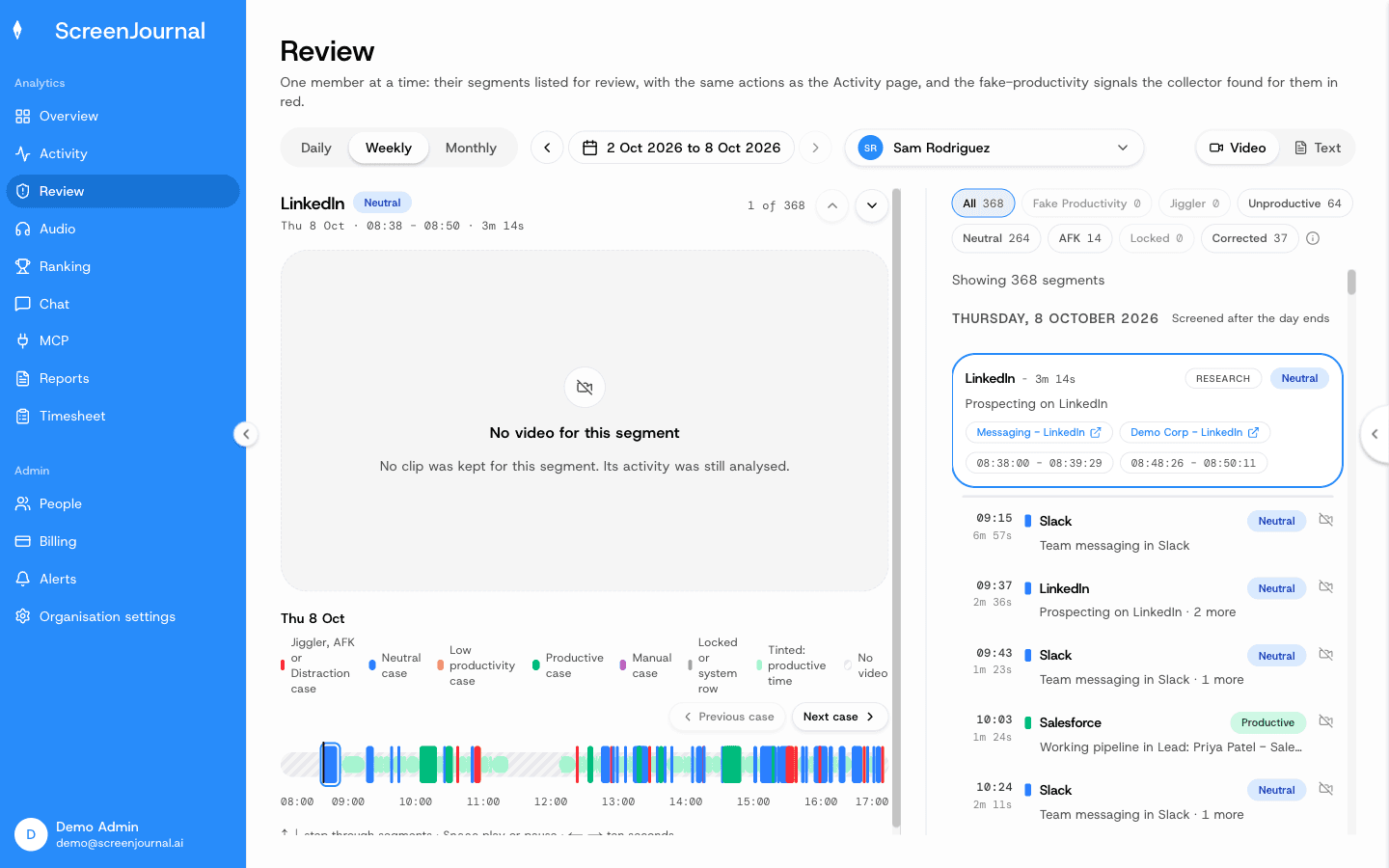
Two views
The page opens in the Video view: the selected segment sits on a stage in the middle, the list runs down the right as a rail, and the member's day lies under the stage as a scrubber, colour-coded by case. Where the desktop policy keeps recordings (Record + Save), the stage plays the member's day as one recording across its clips; where no clip was kept it says "No video for this segment" and the written record is what there is. ↑ / ↓ step through the rail, and Previous case / Next case sit under the stage.
Text drops the player and gives the list the full width for a quick read. Play on a card switches back to Video at that card. The view is in the page address with everything else.
Who can open it
Anyone who can see other members: owners, admins, managers, viewers, team managers with a team, and anyone with reportees. An employee with nobody reporting to them doesn't see it in the sidebar.
Choosing what to list
What you see: a person selector (defaults to you), a Daily / Weekly / Monthly period selector with previous / next arrows, and a row of case chips. Each chip carries how many of the loaded segments fall into its case; All shows everything, and pressing a chip narrows the list to that case without reloading.
Cases:
- Fake Productivity — segments overlapping a fake-productivity signal from the recorder.
- Jiggler — segments where the pointer trail looked like a mouse jiggler. Hidden when your organisation has switched jiggler detection off in the desktop policy.
- Unproductive — score 1–2.
- Neutral — score 3.
- Locked — stretches the machine was locked, switched away from, or stopped for idleness.
- Untracked — every segment a reason can be added to: away (AFK) time, locked time when your organisation counts it as AFK, app segments with an AFK gap in them, and the Tracker Paused and Device Asleep / Offline rows. A segment that already carries a manual entry is not listed, so this case works as a to-do list of unexplained time. Shown, with Manual, only when the organisation has enabled manual timeline entries.
- Manual — entries added by hand.
- Corrected — segments an admin re-scored.
The selection is in the page address, so a review link can be shared. A load covers at most 30 days at a time; step the period for older history.
Reading the list
Each item is the same card as on the Activity timeline, with the same actions gated the same way: Correct score, Play recording, Redact, and on an untracked segment Add AFK / Pause / Offline Reason (see Activity Timeline). Adding a reason opens the same dialog as on Activity; when it is saved the day is read again, so the explained segment leaves the Untracked list and the new manual entry appears under Manual.
Away time that ran across several analysis chunks shows as one Away card, and its reason covers the whole stretch. Time flagged as a mouse jiggler is never folded into a neighbouring away stretch. It is listed on its own as Jiggler only when you are reviewing someone else's time. Nobody can add a reason over their own jiggler-flagged time, including on their own review: a stretch that is jiggler-flagged from end to end never offers the button, or a row in Add reasons, on your own week — only a manager reviewing another member keeps that. A stretch that mixes jiggler time with real work or ordinary away time still takes a reason as usual either way; the entry is written around the jiggler minutes, never over them. Add reasons, at the top of the list, explains several stretches at once across every loaded day: tick the ones that belong together (nothing is ticked for you), type one reason and pick one verdict. Each is saved in turn, and any that fail stay ticked so you can try again.
Correct all as productive, beside it, is the Correct score action for the whole list at once: it re-scores every listed segment that can be corrected as Productive. Shown to owners and admins, it counts only what is listed — narrow the list with the case chips first — and leaves alone what already reads Productive, manual entries and wholly-away stretches, exactly as the pencil on each card does. A confirmation names the count and the member before anything is written, because there is no bulk undo: each segment would have to be corrected back on its own. The segments are saved in turn; any that fail keep their score and stay counted, so pressing the button again retries them.
Under a card, red lines list any fake-productivity signals whose time range covers it: the signal, a description, and the overlapping ranges.
A card with no red lines is not "cleared": it only means no signal was attached to it, or the screening hasn't run for that day yet. The status line shows how many segments are listed and how far a long load has got.