What is ScreenJournal?
Updated on 14 September 2026
ScreenJournal is a next generation alternative to time tracking and employee monitoring. Instead of counting hours or storing screenshots, it reads the real work happening on screen, builds a detailed timeline of each workday, and, by default, discards the footage. Timelines accumulate into a chronicle: a searchable history of the work itself, where an employee can find how they solved a problem last quarter and a colleague can learn how another team gets things done, just by asking. From the same record ScreenJournal computes timesheets, builds reports and drafts standup summaries on request. It is built privacy-first. Apps and sites on the privacy exclusion list are never captured, PII is removed during processing, and employees can redact anything when the organisation allows it.
Most work visibility tools fall into three camps: screenshot trackers that store periodic captures, surveillance suites that record everything for investigation, and activity analytics that score how busy the apps looked. ScreenJournal is a fourth kind. It reads the work itself, stores no footage by default, and keeps a searchable derived history, so a manager gets answers about real output rather than an archive to interpret. The honest comparison is on ScreenJournal vs the alternatives.
How does ScreenJournal work?
ScreenJournal works in three steps. It records screen activity as short-lived video while work happens. A frontier AI model analyses that video to understand the work and measure real output. By default the video is then deleted immediately during processing. Where a manager needs video evidence they can opt in to keep the recordings for the organisation or a team, in what this site calls Evidence Mode, and those recordings are stored for up to 3 months. What remains in every case is derived insight: the timeline of each day, the chronicle those timelines build, and answers to questions about both.
The design is called derive-and-discard. The screen is read only long enough to derive understanding, then the footage is discarded. What is kept is the understanding: which task was worked on, in which app, for how long, and what came of it. That derived record is what powers everything else on this page.
What does a ScreenJournal timeline show?
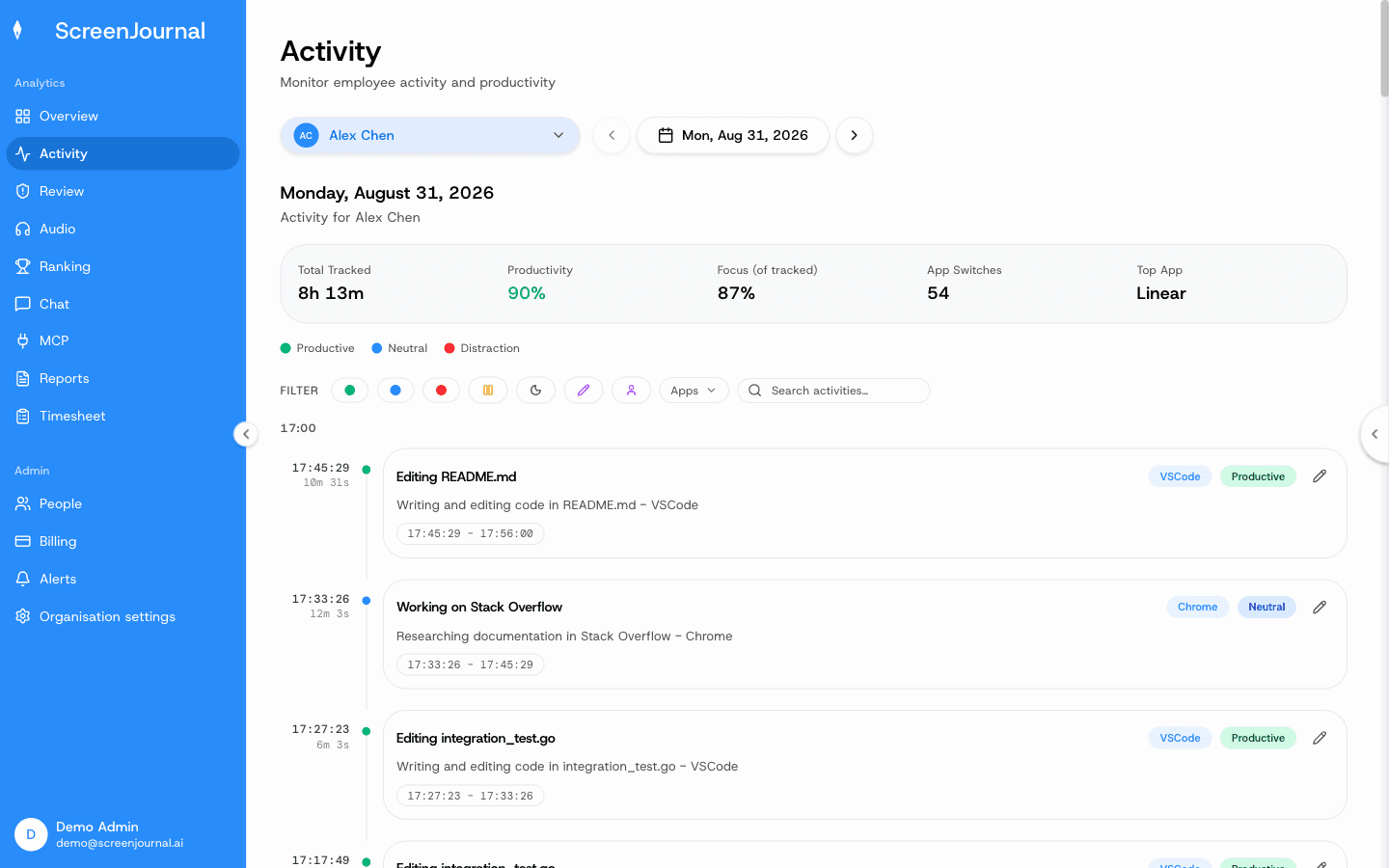
Every person's day appears as a scored, per-session timeline. Each entry shows the app it happened in, a plain-English summary of what was done, how long it took and a productivity score, and it expands for more context. It is the record everything else is generated from: timesheets, reports and the chronicle, with standups drafted on request.
Sessions are scored, and each entry expands to show the context behind its summary and score. The work timelines page covers the anatomy in full, including privacy exclusions and how redaction works.
Proof: the Activity page, one person's day as scored segments with the app, time range, duration and an AI-written description; hover a segment for Correct score, Play recording and Redact, each gated by role and policy.
What is the work chronicle?
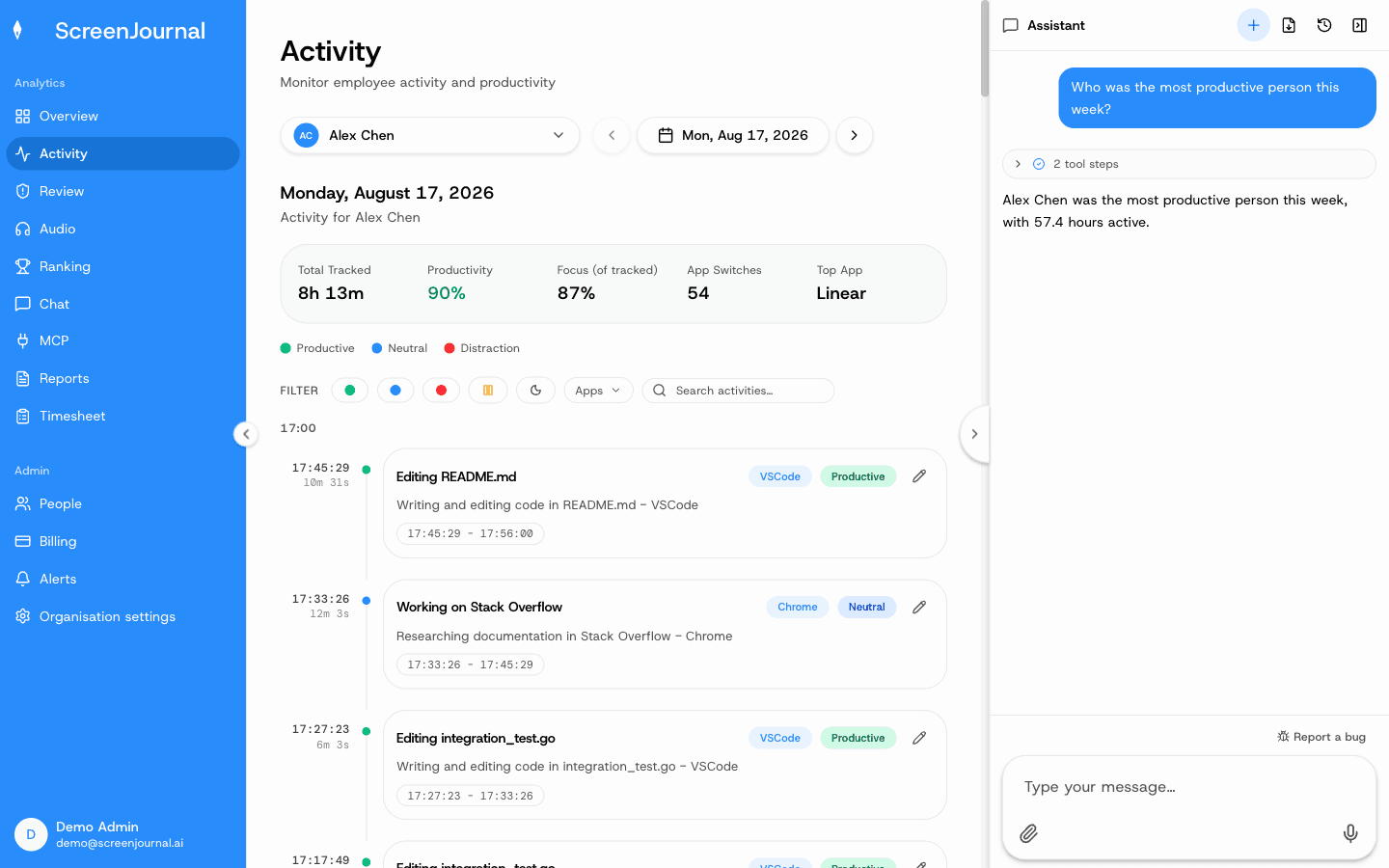
The chronicle is every timeline, kept and made searchable. It turns the company's work into organisational memory: an employee can search their own past, a colleague can learn how another team does a piece of work, and a manager can trace how something was actually done, by asking in plain English.
Access is permission-scoped by role, questions go through the ScreenJournal chat or the MCP, and entries an employee has redacted are erased entirely, so they never appear in anyone's search. By default the raw footage is gone either way; what is searchable is the understanding, not screenshots. The chronicle keeps the most recent 12 months of derived work history. More on the work chronicle page.
Proof: the Assistant chat (Ask AI) open beside the dashboard, showing the data it consulted before answering.
What does ScreenJournal generate?
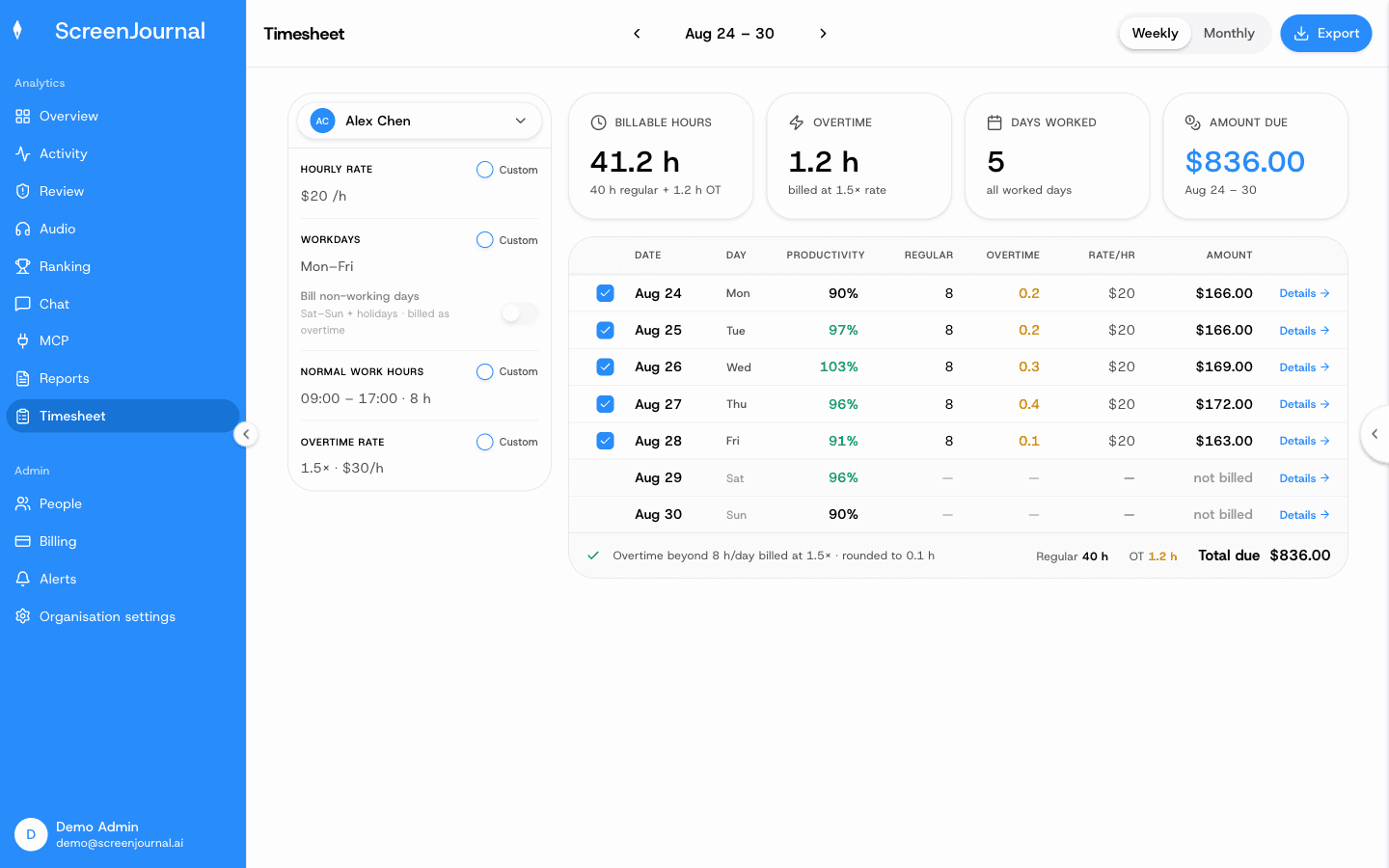
ScreenJournal generates timesheets and reports from the timeline, and drafts standup summaries on request. The Timesheet page turns tracked hours into pay per person per week or month; the Reports page builds Excel workbooks for productivity, attendance and app usage; standups are drafted on request by the AI assistant.
The Timesheet page turns each person's tracked hours into pay for the week or month: billable hours, overtime, days worked and the amount due, computed from an hourly rate and the working calendar. A manager can exclude a day or any single segment, or drop every below-productive segment in one go, and export the period as CSV for payroll. The AI timesheets page shows the full flow.
Proof: the Timesheet page, with billable hours, overtime, days worked and amount due for one person and a row per day that opens into its segments.
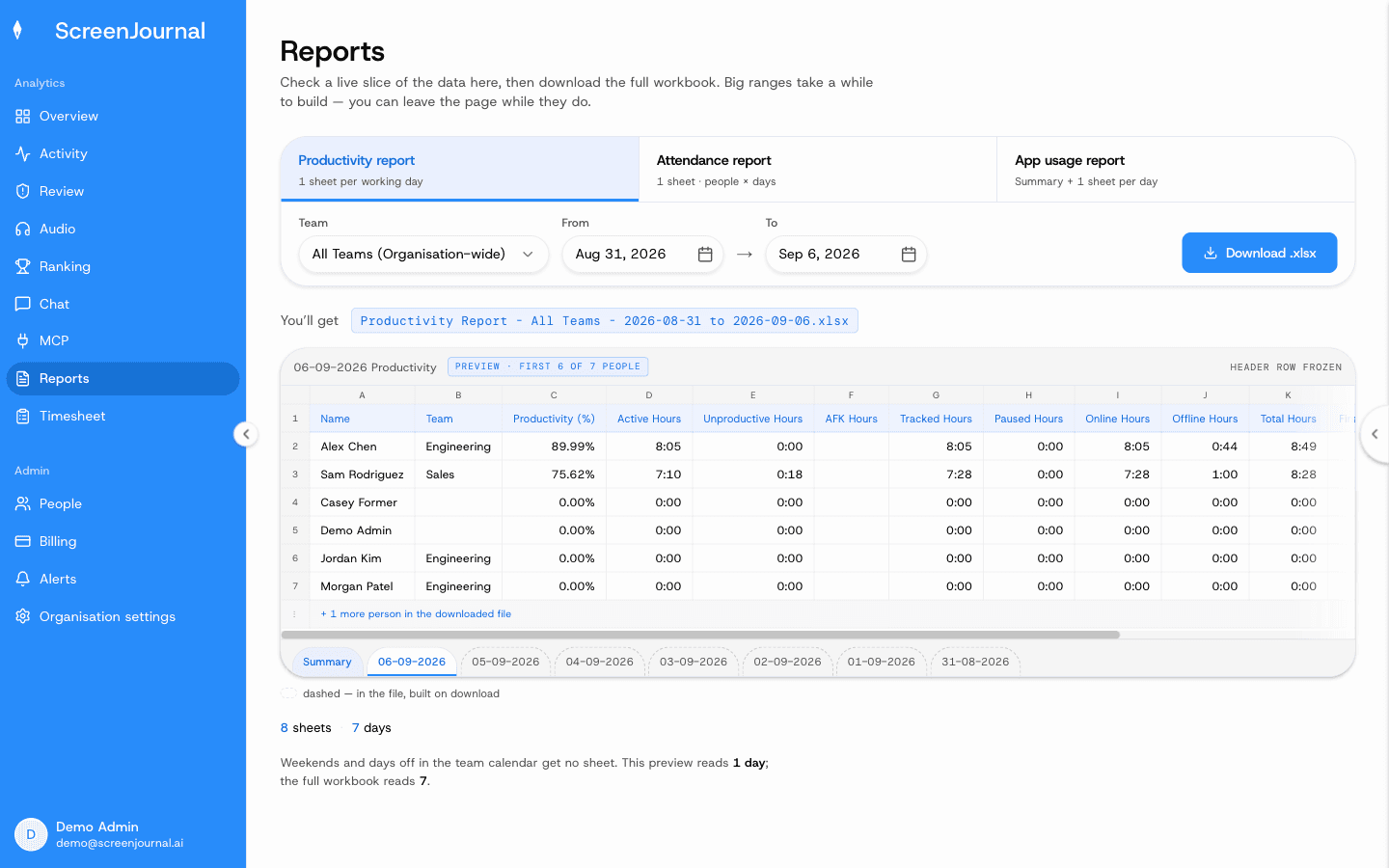
Reports are Excel workbooks built on demand: productivity (one sheet per working day plus a summary), attendance (people by days) and app usage (time per application), each previewed before download, with the Overview dashboard and the weekly Ranking showing the same numbers on screen. For anything a workbook does not cover, the AI assistant answers from the same derived record, in the product or through the ScreenJournal MCP. Standups come from the same assistant: ask in the dashboard or over the MCP and yesterday's update is drafted from the timeline, ready to glance over, tweak and post.
Proof: the Reports page, with the report chooser, scope and date range, and a live preview of the workbook before download.
How does ScreenJournal protect employee privacy?
In three layers. Apps and sites on the organisation's privacy exclusion list, such as banking, payroll, HR and health, are never captured. PII is removed during processing, before anything is stored. And employees can redact anything on their timeline when the organisation allows it.
The defaults lean the same way: nudges are off until an admin writes an alert rule, an admin can correct any score the AI misread, and employees see the same activity view managers do. Redaction erases a segment entirely rather than hiding it, with two limits: who may redact is a permission administrators grant, and a segment already kept as evidence for an alert cannot be redacted.
Proof: the Activity page, one person's day as scored segments with the app, time range, duration and an AI-written description; hover a segment for Correct score, Play recording and Redact, each gated by role and policy.
Who is ScreenJournal for?
Any industry where work happens on a computer. It suits managers of remote, hybrid, offshore and BPO teams who need accurate timesheets and operational truth without micromanaging, and it suits employees who want their real output recognised and their work history searchable.
In practice the highest-intent segments are BPOs and call centres (proof of work and billing accuracy without a screenshot archive), offshore teams (verified hours and real output across the time-zone gap), agencies (client-billable timesheets from real work), and engineering teams (progress tied to what actually shipped, including visibility into AI-assisted coding sessions). One honest note: if a client or regulator contractually requires stored screenshot evidence, a screenshot tracker meets that requirement in a way ScreenJournal deliberately does not. For every other kind of proof, an interpreted timeline is the stronger record.
Frequently asked questions
Does ScreenJournal store screenshots or video?
Not by default. It takes no screenshots; the transient capture is video, and that video is deleted during processing. A manager can opt in to keep video evidence for the organisation or a team, and those recordings are stored for up to 3 months. PII is removed from what is kept, and employees can additionally redact parts of their timeline when the organisation allows it.
Does ScreenJournal log keystrokes?
No. It reads work output, not keystrokes.
Is ScreenJournal a time tracker?
No, though it replaces one. Time trackers count hours and approximate effort from input activity. ScreenJournal reads what was produced inside the hours and prepares the timesheet from that record, so hours are accounted for without running a timer.
Can employees see what managers see?
Yes. Employees see the same activity view managers do, with additional control over their own data: apps and sites on the privacy exclusion list are never captured, segments can be redacted when the organisation grants that permission, and every score they see is the one their manager sees.
Is ScreenJournal employee monitoring software?
No. It is built as a next generation alternative to it. Monitoring software stores screenshots or video for a manager to review; ScreenJournal reads the work, keeps the derived insight and, by default, deletes the raw screen data, so it does the jobs monitoring is bought for, proof of work and accurate hours, without a footage archive.
See the work itself, not screenshots of it
Timesheets, reports and answers from the work your team actually did. Available for Windows and macOS, with Linux and mobile support coming soon.