Ask AI: plain-English answers about your team's work
Updated on 14 September 2026
Ask AI is ScreenJournal's built-in assistant. It answers questions about your team's work in plain English: who is on track, where the billable hours went, how something was done last month. Answers come from timelines derived from the work itself, not from footage; by default the raw screen data is deleted during processing.
What is Ask AI?
Ask AI is the assistant built into ScreenJournal (labelled Chat in the sidebar), and it opens as a panel beside whatever page you are on. Ask it who is on track, who is stuck, what is about to slip, where the billable hours went, or how a piece of work was done last month, and it answers in plain English. The answers come from derived data, the timelines and the chronicle they build into, not from footage.
Proof: the Assistant chat (Ask AI) open beside the dashboard, showing the data it consulted before answering.
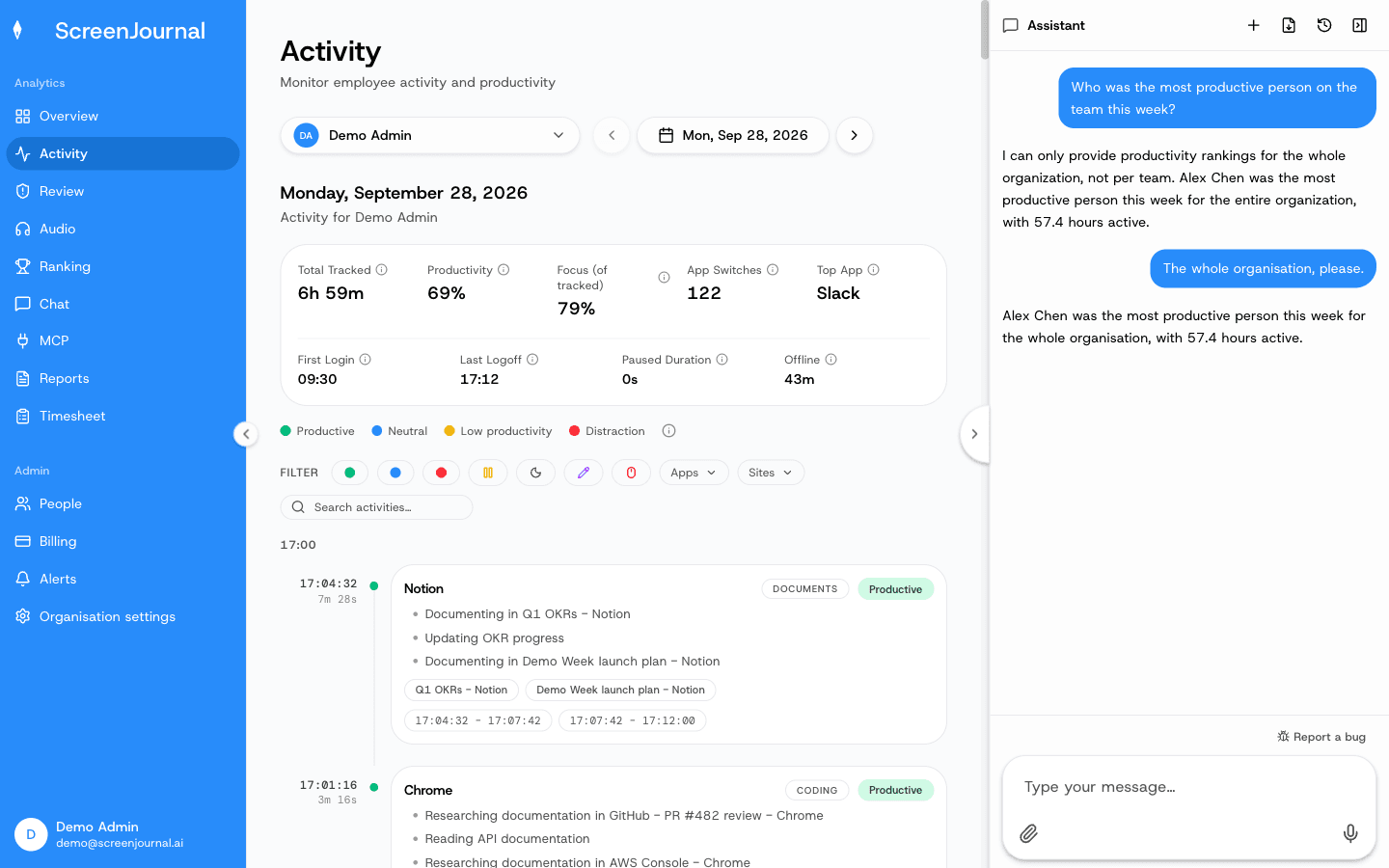
Because every answer is grounded in the work timeline, Ask AI is not guessing from app names or activity percentages. It is reading a record of what was actually done: which app, what was produced, how long it took, and how it scored.
How does Ask AI answer questions?
Ask AI answers from a record that is derived first and questioned later. It works in three steps.
- ScreenJournal reads on-screen work as it happens. Apps and sites on the organisation's privacy exclusion list, such as banking, payroll, HR and health, are never captured.
- A frontier AI model turns that activity into a timeline. Each entry records the app, what was done, how long it took and a productivity score. PII is removed during processing, and by default the raw screen data is deleted during processing; where a manager has opted in to keep video evidence, in what this site calls Evidence Mode, those recordings are stored for up to 3 months, and Ask AI still answers from the derived record.
- Ask AI answers from the derived record. Questions about this week are answered from current timelines; questions about last quarter are answered from the chronicle, the searchable history those timelines accumulate into. Every answer is scoped to the asker's role permissions.
Proof: the Assistant chat (Ask AI) open beside the dashboard, showing the data it consulted before answering.
What can you ask?
Anything you would otherwise interrupt someone to find out. Managers ask about progress and hours, employees search their own history, and colleagues learn how another team does a piece of work, all subject to permissions. Typical questions:
- "How is the website project going, and what is about to slip?"
- "Where did the billable hours go this week?"
- "How did we fix the invoice sync bug in March?"
- "What did I actually work on last Tuesday?"
The last two are chronicle questions. Because timelines are kept and made searchable, Ask AI can answer from the work chronicle by meaning rather than by date, and a question that would once have been a meeting becomes a thirty-second exchange.
Proof: the Assistant chat (Ask AI) open beside the dashboard, showing the data it consulted before answering.
How is Ask AI different from other monitoring tools' AI chat?
The difference is not the chat, it is the data underneath it. Several monitoring and analytics tools now offer AI assistants, and they typically answer from usage data, meaning which apps were open, which sites were visited and how active the inputs looked. ActivTrak, for example, ships a conversational assistant that answers from app and website usage. Ask AI answers from the work itself, and that changes two things.
- The source. Usage data supports questions like "how much time was spent in Figma". A derived record of the work supports "what was designed, and for which project". One describes busy-ness, the other describes output. An AI workforce analytics chat can only be as good as what sits underneath it.
- The storage. With ScreenJournal, by default the raw screen data behind every answer is deleted during processing, so the insight exists without a footage archive to secure, review or leak.
For the full category comparison, see ScreenJournal vs activity analytics.
Who is Ask AI for?
Anyone whose questions about work are currently answered by interruption. Managers of remote, hybrid, offshore and BPO teams get progress answers without scrolling dashboards or footage: you ask how the project is going and check in once. Employees get their own past made useful, with solved problems, finished work and forgotten details findable again. New hires and cross-team colleagues learn how work is actually done without booking a meeting. It works in any industry where work happens on a computer, and the same derived record also powers AI standups and the ScreenJournal MCP.
Frequently asked questions
What is ScreenJournal?
ScreenJournal is an AI work visibility tool that reads on-screen work as it happens, turns it into a detailed timeline of what each person actually did, and then, by default, deletes the raw screen data. Timelines accumulate into a searchable chronicle of everyone's work history, and from them ScreenJournal generates timesheets and reports automatically and drafts standup summaries on request, answering questions about any of it in plain English.
What data does Ask AI use to answer questions?
Derived data only, meaning the work timelines and the chronicle they accumulate into. By default raw screen data is deleted during processing, PII is removed during processing, and every answer respects the asker's role permissions.
Can employees use Ask AI?
Yes. Employees see the same activity view managers do, and they can search their own work history, so what they did, when they did it, and how they solved something months ago is findable again.
Can Ask AI show my manager my screen?
No. Ask AI answers from the derived record only. ScreenJournal takes no screenshots and stores no video by default; a manager can opt in to keep video evidence for the organisation or a team, stored for up to 3 months, but Ask AI still answers from timelines, timesheets, reports and plain-English answers rather than footage.
Is my personal activity visible to Ask AI?
Only what is in your timeline, and only to people whose role already lets them see it. Apps and sites on the organisation's privacy exclusion list are never captured, so they cannot reach Ask AI either. Anything else can be redacted by whoever the organisation's redaction settings allow; a redacted entry is erased entirely and never appears in anyone's search.
See the work itself, not screenshots of it
Timesheets, reports and answers from the work your team actually did. Available for Windows and macOS, with Linux and mobile support coming soon.