What is derive-and-discard?
Updated on 14 September 2026
Derive-and-discard is a privacy design where software reads the screen only long enough to derive understanding, then discards the footage. The insight is kept, the footage is not. ScreenJournal pioneered the approach for work visibility and uses it by default: managers get a detailed record of the work, with no screenshot archive behind it.
Traditional employee monitoring works by storage: capture the screen, keep the captures, let a manager interpret them later. Derive-and-discard inverts that order. Interpretation happens in the moment, and by default the storage never happens. In ScreenJournal's implementation the transient capture is video: by default the screen is recorded as short-lived video, the work is read from it, and the video is deleted during processing. Where a manager needs video evidence they can opt in to keep the recordings for their organisation or team, in what this site calls Evidence Mode, and those recordings are stored for up to 3 months. It is what searches for screenshot-free monitoring and employee monitoring without screenshots are really asking for: captures that are not kept by default, rather than hidden or blurred.
Why are screenshot archives the real risk?
Screenshot archives are the real risk in employee monitoring because every stored capture is a liability: it can leak, it can catch personal content, and someone has to review it. The debate about monitoring usually focuses on being watched, but the lasting harm comes from what is kept.
The first problem is leakage. An archive of employee screens is a dense store of sensitive data: customer records, credentials, contracts, and personal messages that slipped into frame. It has to be secured, access-controlled and explained to auditors, and if it is ever breached, everything in it leaks at once.
The second is resentment. People behave differently when footage of them persists. A stored capture is not just evidence of work; it is a picture of a person's screen that someone can call up later. Screenshot tools typically offer blur and deletion controls for stored captures, yet the archive itself remains.
The third is the review burden. Stored captures answer nothing on their own. Someone has to scroll them, interpret them and reconstruct what was happening, which turns managers into reviewers of footage rather than managers of work.
How does derive-and-discard work?
Derive-and-discard works in three steps. The screen is recorded as short-lived video as work happens. A frontier AI model analyses that video to understand and measure the work. By default the video is then deleted immediately during processing, leaving only the derived record: the timeline, the numbers and the answers.
- Read. Screen activity is recorded as short-lived video, live, while the work is happening. Apps and sites on the organisation's privacy exclusion list, such as banking, payroll, HR and health, are never captured.
- Derive. A frontier AI model analyses the video to understand what was done: which app, what task, how long it took and what it produced. PII is removed during processing, before anything is stored.
- Discard. By default the video is deleted immediately during processing: it exists for the moment of analysis and is not stored. No screenshots are taken at any point, whichever mode is in use.
What remains after the footage is deleted?
What remains is a work timeline: a detailed, plain-English record of what each person actually did, with apps, durations and productivity scores. Timelines accumulate into a searchable chronicle of the team's work history, and timesheets and reports are prepared from the same derived record.
This is the design ScreenJournal is built on. ScreenJournal is an AI work visibility tool that reads on-screen work as it happens, turns it into a detailed timeline of what each person actually did, and then, by default, deletes the raw screen data. Timelines accumulate into a searchable chronicle of everyone's work history, and from them ScreenJournal generates timesheets and reports automatically and drafts standup summaries on request, answering questions about any of it in plain English.
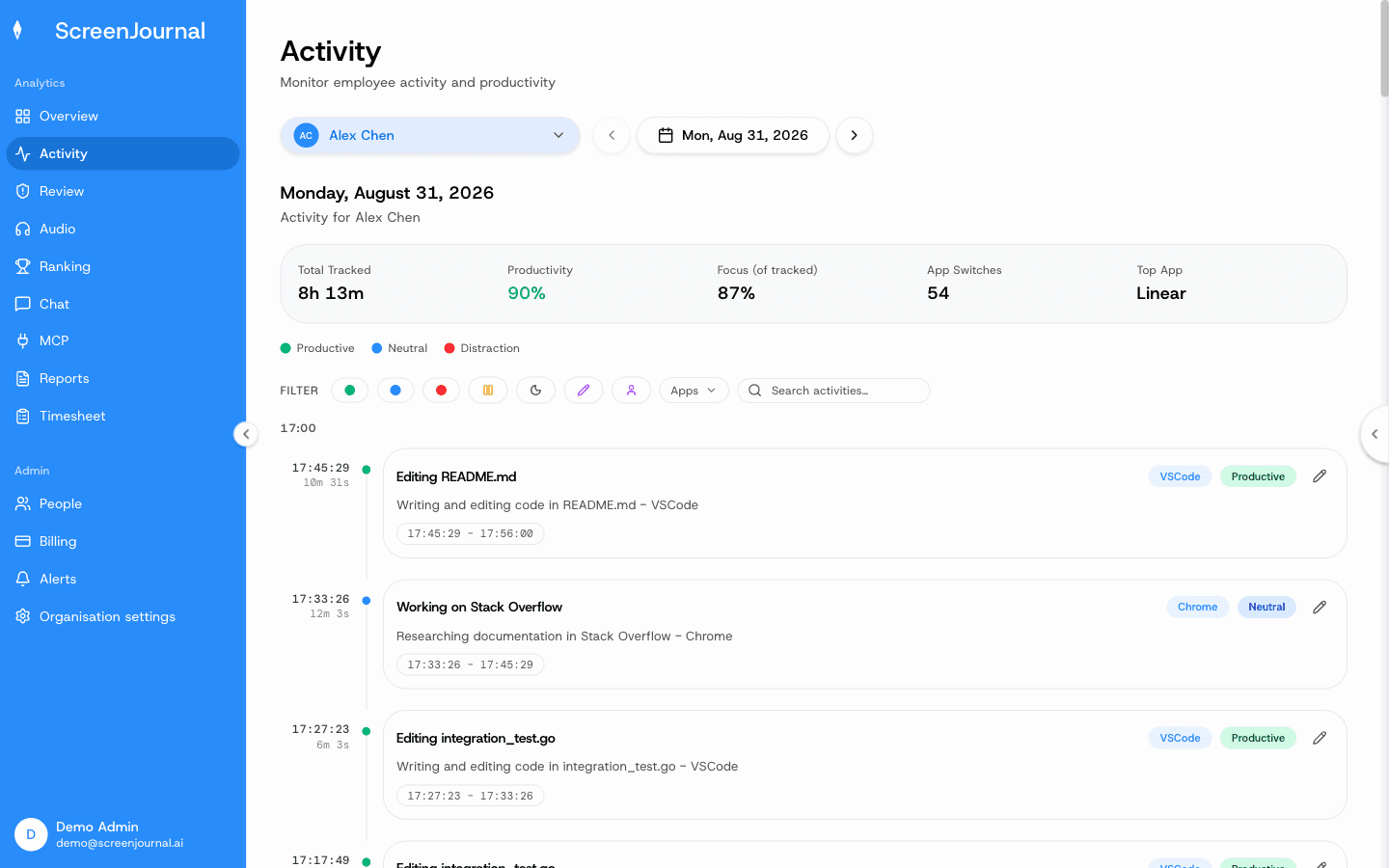
On the Activity page, every work timeline entry shows the app it came from, a plain-English summary of what was done, how long it took and a productivity score, and each entry expands for context.
Proof: the Activity page, one person's day as scored segments with the app, time range, duration and an AI-written description; hover a segment for Correct score, Play recording and Redact, each gated by role and policy.
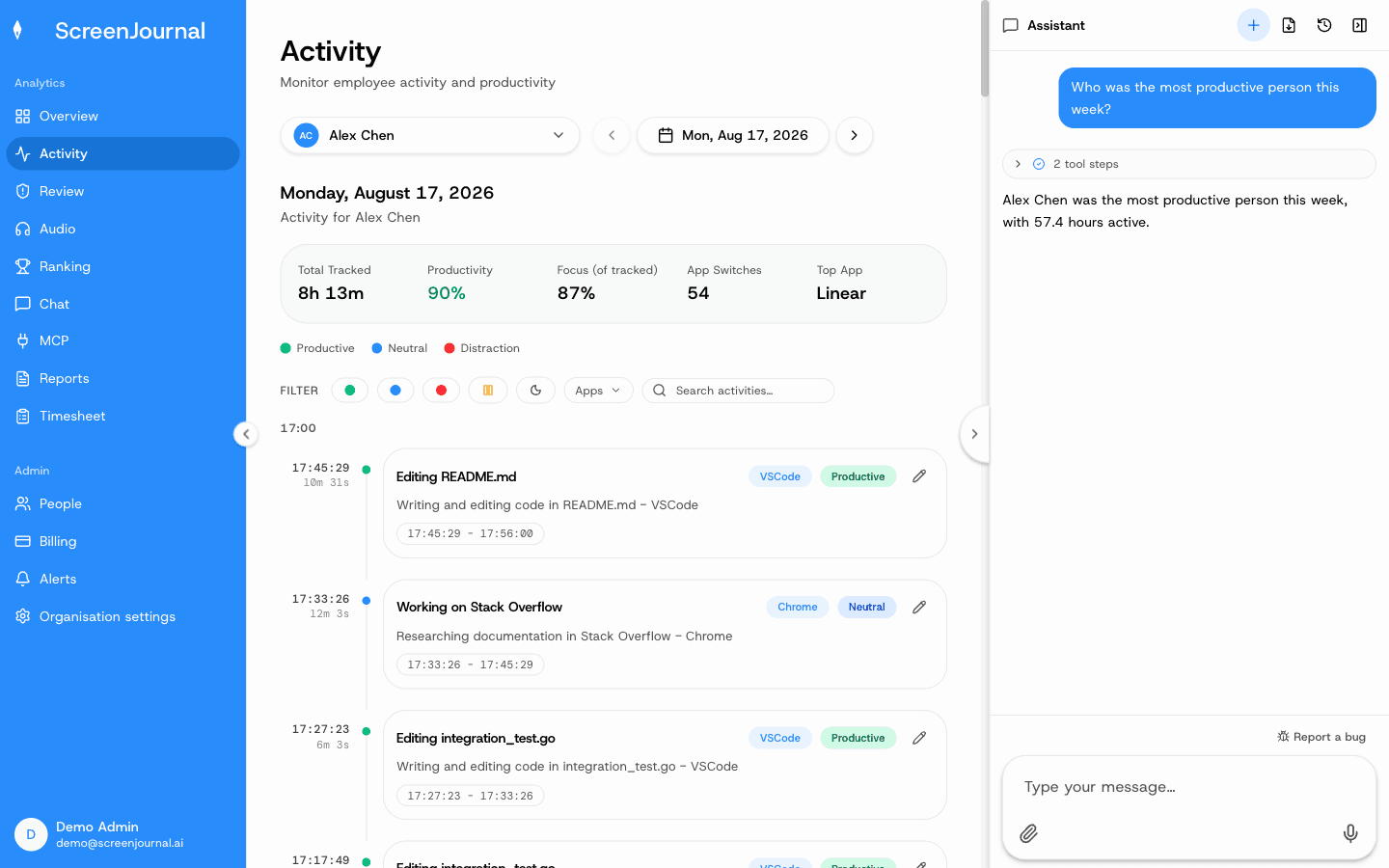
Because the record is derived rather than photographic, it can be asked questions. The Assistant chat (Ask AI) opens beside any page and answers from the derived data, never from footage.
Proof: the Assistant chat (Ask AI) open beside the dashboard, showing the data it consulted before answering.
Employees keep control of what enters the record. Excluded apps and sites are never captured, and a Redact control lets an employee remove entries when the organisation allows it. Over time the timelines build into the work chronicle, a searchable history of the work itself, permission-scoped by role.
Proof: the Activity page, one person's day as scored segments with the app, time range, duration and an AI-written description; hover a segment for Correct score, Play recording and Redact, each gated by role and policy.
How is derive-and-discard different from storing screenshots?
The difference is what exists after monitoring has run. With screenshot storage, an archive of captures accumulates and every question is answered by reviewing it. With derive-and-discard, ScreenJournal's default, only the interpreted record exists: there is nothing to scrub through, nothing to secure and nothing to leak.
The table below compares the two designs side by side.
| Screenshot storage | Derive-and-discard | |
|---|---|---|
| What exists afterwards | An archive of captures, typically kept for weeks or months | Derived timeline entries, scores and a searchable history |
| Personal content | Can be caught in captures; blurring is typically optional | Skipped in real time, with PII removal and employee redaction |
| Getting answers | Review the archive yourself | Ask, and the derived record answers |
| Leak exposure | The archive is a breach target | No footage exists to leak by default |
| Proof of work | An image a manager must interpret | An interpreted record of what was done |
Who is derive-and-discard for?
Derive-and-discard suits any team that needs real visibility of work but does not want to hold footage of its people: BPOs and call centres proving delivery without storing thousands of screenshots per agent, agencies billing clients from real work, and managers of remote or offshore teams who need answers rather than archives.
It also suits the employees being read. Because nothing raw is kept by default, there is no archive of anyone's screen to secure, explain or leak, and the record that does exist is one employees can see, and an admin can correct.
One honest caveat. If a client or regulator contractually requires stored screenshot evidence, derive-and-discard cannot supply it, because the screenshots do not exist. In that specific case a screenshot tracker fits the requirement better; ScreenJournal vs screenshot trackers covers when each design is the right choice.
Frequently asked questions
Does derive-and-discard mean my employer never sees my screen?
Not as footage by default. Under derive-and-discard, ScreenJournal's default mode, there are no screenshots or recordings to watch back; a manager can opt in to keep video evidence for their team, stored for up to 3 months, and members are told at sign-in. Managers see derived insight: the timeline, timesheets and reports. Employees see the same activity view managers do, and can redact segments when the organisation allows it. A redacted entry is erased entirely and never appears in anyone's search.
Is derive-and-discard the same as blurring screenshots?
No. Blurring stores the screenshot and obscures part of it, so the archive still exists and still has to be secured. Derive-and-discard stores no screenshot at all. What is kept is the understanding of the work, not an image of the screen.
When is the raw screen data deleted?
By default, raw screen data is deleted immediately during processing: the transient capture is video, and nothing raw is retained beyond analysis, so no video archive builds up. Where a manager has opted in to keep video evidence, those recordings are stored for up to 3 months. No screenshots are taken in either case.
Can work still be proven without stored screenshots?
Yes. Every timeline entry records what was done, in which app, for how long and with what score. For most purposes that is stronger evidence than a screenshot, because it is already interpreted and tied to output. The exception is a contract or regulator that specifically requires stored screenshot evidence, which derived records cannot supply.
Is derive-and-discard unique to ScreenJournal?
No, not by design, though ScreenJournal pioneered it for work visibility. The design itself is one any tool could adopt: read, derive, delete. What matters when evaluating a tool is whether raw data is genuinely deleted and whether the derived record is useful on its own.
See the work itself, not screenshots of it
Timesheets, reports and answers from the work your team actually did. Available for Windows and macOS, with Linux and mobile support coming soon.