ScreenJournal vs activity analytics tools (ActivTrak, WorkTime, Prodoscore)
Updated on 14 September 2026
ActivTrak, WorkTime and Prodoscore measure how work looks from the outside: which apps were open, which sites were visited, how active the tools appeared. That produces a busy-ness score. ScreenJournal reads the work itself, so its numbers describe output: what was produced, how long it really took, and whether it moved anything forward.
That distinction, proxy versus output, is the whole comparison. Activity analytics is the least invasive of the three incumbent monitoring camps, and for some teams it is genuinely enough. This page explains what the category does well, where the proxy breaks down, and when a work visibility tool is the better fit.
What are activity analytics tools?
Activity analytics tools measure productivity from usage signals: which applications and websites were used, for how long, and whether someone was active or idle. Usage is categorised as productive or unproductive, then rolled into scores, dashboards and trends. ActivTrak, WorkTime and Prodoscore are the best-known tools in the category.
ActivTrak tracks application and website usage with productivity categorisation and active versus idle time. It markets itself as privacy-conscious: there is no keystroke logging at any tier and no continuous screen recording. Screenshots are off by default and available only through its Screen Details add-on, or a Full Details setting per configuration, with captures triggered by alarms rather than taken on a schedule. ActivTrak also now ships a conversational AI assistant that answers questions from its usage data. WorkTime positions itself as non-invasive monitoring, with productivity metrics and no screenshots or keystroke content. Prodoscore produces a single productivity score from metadata in cloud apps, email and calendar, with no screenshots at all.
The category's appeal is real. It is less invasive than screenshot trackers, far less invasive than surveillance suites, quick to roll out, and useful for licence utilisation and capacity questions. The trade-off sits in the data itself: usage signals record the shape of work, not the work.
What is ScreenJournal?
ScreenJournal is an AI work visibility tool that reads on-screen work as it happens, turns it into a detailed timeline of what each person actually did, and then, by default, deletes the raw screen data. Timelines accumulate into a searchable chronicle of everyone's work history, and from them ScreenJournal generates timesheets and reports automatically and drafts standup summaries on request, answering questions about any of it in plain English.
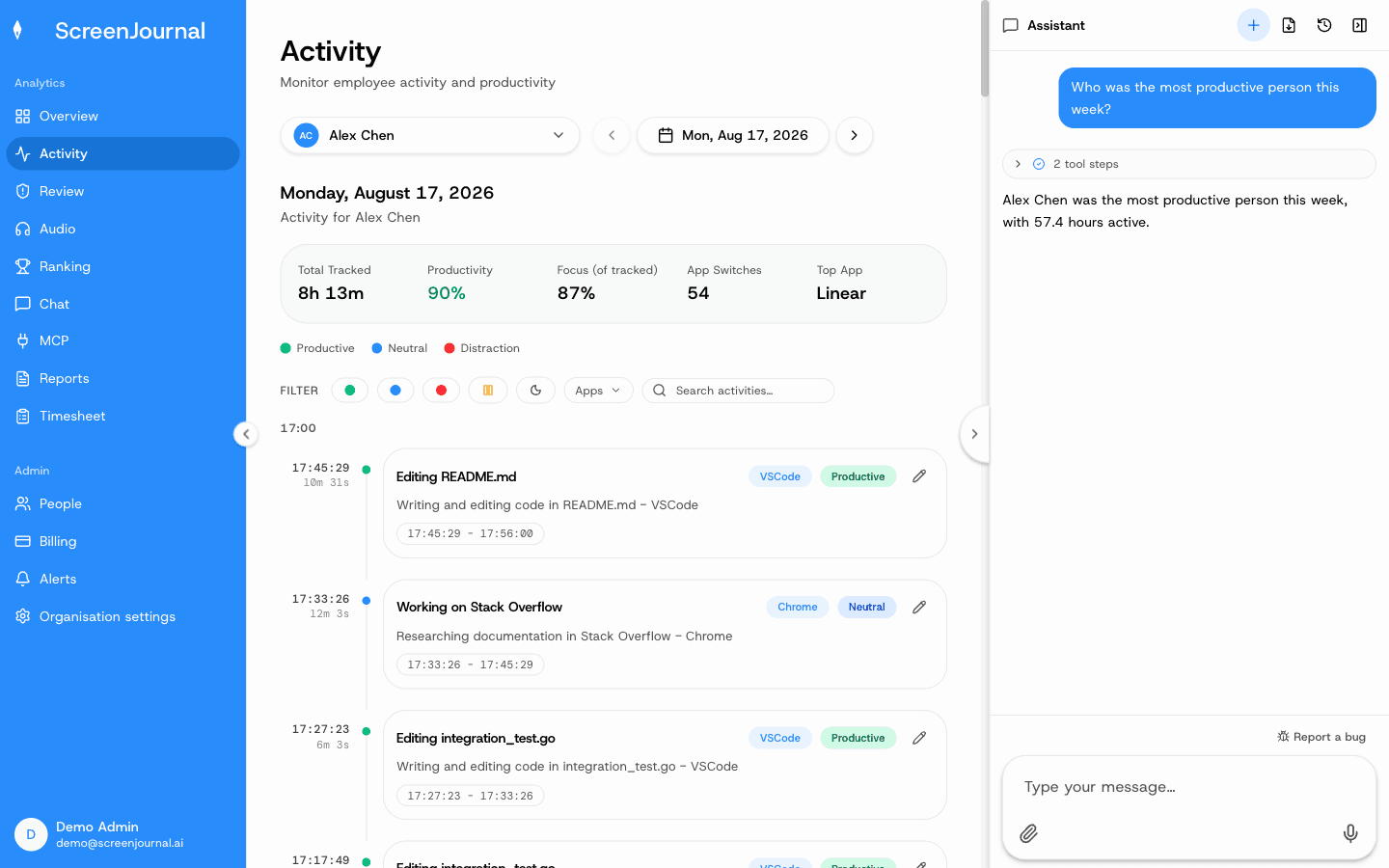
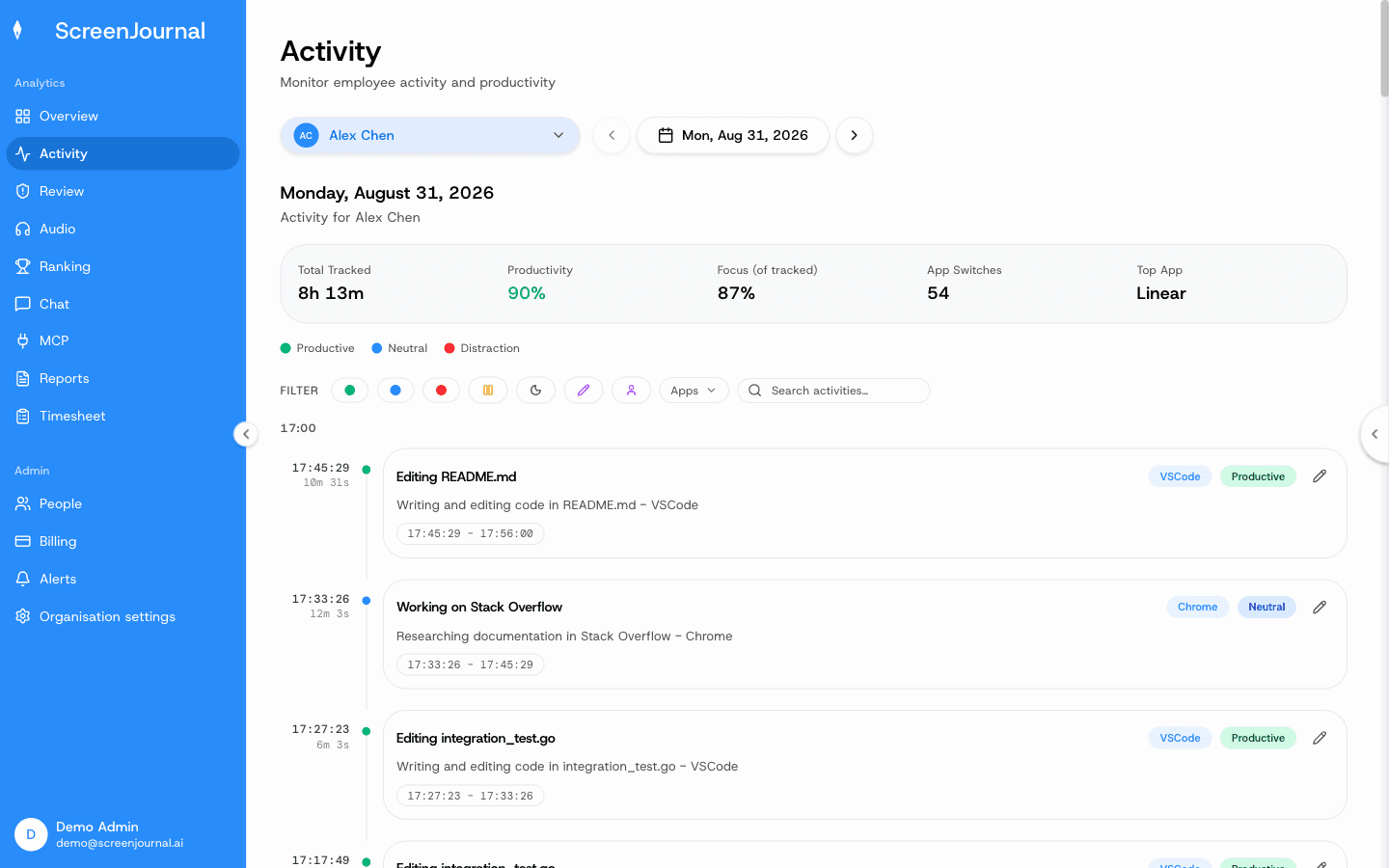
The work timeline is the source record: a scored, per-session account of the day, where every entry carries an app badge, a duration and a plain-English summary of what was done. Past timelines accumulate into the work chronicle, which is searchable through chat and MCP and permission-scoped by role.
Proof: the Assistant chat (Ask AI) open beside the dashboard, showing the data it consulted before answering.
How is ScreenJournal different from activity analytics tools?
The difference is the source of truth. Activity analytics infers productivity from which apps were used and how active they looked. ScreenJournal reads the on-screen work as it happens, has a frontier AI model describe what was actually done, then deletes the raw screen data by default. One measures a proxy for work; the other measures the work.
The table below summarises how the two approaches differ in practice.
| Activity analytics (ActivTrak, WorkTime, Prodoscore) | ScreenJournal | |
|---|---|---|
| What it captures | Application and website usage, active versus idle time, productivity categories | Work activity on screen, read by AI in the moment |
| What it stores | Usage metadata and scores; ActivTrak can also store alarm-triggered screenshots where its add-on is enabled | Derived timelines, timesheets and reports; recordings are not stored by default, and a manager can opt in to keep video evidence for up to 3 months |
| The core number | A productivity or activity score from app time | Output measured from what was actually done |
| How you get answers | Dashboards to interpret; ActivTrak adds an AI assistant that answers from usage data | Ask AI on every page and MCP, answering from the work itself |
| Timesheets | Usually absent or timer-based | Computed from tracked hours, with each day opening into the segments behind it |
| Employee privacy | Typically no keystroke content; usage metadata is retained | Excluded apps and sites never captured, PII removed, redaction that erases the entry entirely, no stored footage by default |
| Searchable history | Usage trends by date range | A chronicle searchable by meaning ("the invoice bug in March") |
| Cheating resistance | Time in the right apps reads as productive | Output-based, so idle time in a productive app achieves nothing |
Two nuances keep this comparison honest. First, "no screenshots" is not a uniform category trait: Prodoscore and WorkTime do not capture screens, while ActivTrak sells screenshot capability as an add-on, triggered by alarms per configuration. Second, an AI assistant is no longer a differentiator on its own; several analytics vendors now offer one. The question that matters is what the AI answers from. An assistant sitting on usage data can describe how app time trended. An assistant sitting on the work itself can say what was produced.
ScreenJournal's privacy position is also worth stating plainly, because it reads more than usage yet stores less. Apps and sites on the organisation's privacy exclusion list, such as banking, payroll, HR and health, are never captured. PII is removed during processing, employees can redact entries when the organisation allows it, and by default the raw screen data is deleted during processing. Where a manager needs video evidence they can opt in to keep the recordings (Evidence Mode), and those recordings are stored for up to 3 months. A redacted entry is erased entirely and never appears in anyone's search; who may redact is a permission the organisation's administrators grant, and nobody has it until they do.
Proof: the Activity page, one person's day as scored segments with the app, time range, duration and an AI-written description; hover a segment for Correct score, Play recording and Redact, each gated by role and policy.
What do productivity scores from app usage miss?
They miss the work itself. An app-usage score counts three hours in Figma as three productive hours, whether a design shipped or nothing did. It counts time in an unrecognised tool as unproductive, however real the work. The score describes app time; it cannot describe output.
Misclassification is the everyday version of this problem. App categories need constant tuning, and every team has legitimate work that happens in the "wrong" places: a developer reading a competitor's site, a support agent in a spreadsheet, a designer in a browser-based tool the category list has never heard of. The person doing the most original work is often the one whose score suffers.
The gap also cuts the other way. Because time in approved apps reads as productive, an activity score rewards presence over output. Someone parked in the right application scores well without producing anything, while a colleague who ships real work in two focused hours looks unremarkable. ScreenJournal reads those three hours in Figma as what was designed and for which project, because the AI describes the work rather than naming the app. Its score attaches to each timeline entry, is derived from the work itself, is visible to the employee it describes, and can be corrected by an admin when the AI misread the work.
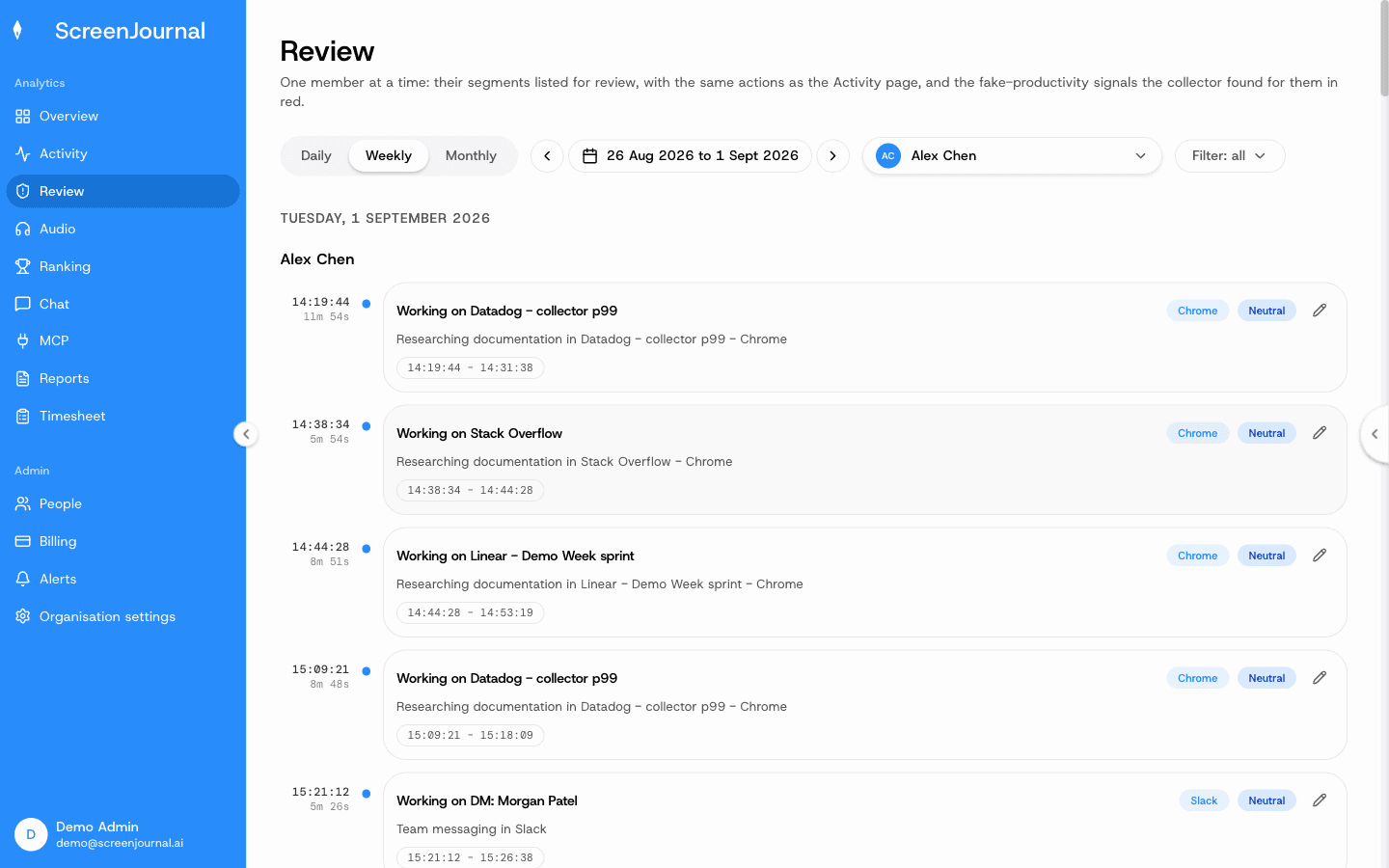
Proof: the Review page, listing one member's flagged, unproductive, manual and corrected segments with Correct score, Play recording and Redact on each.
When are activity analytics tools the right choice?
Activity analytics is the right choice when usage statistics are genuinely all you need.
- You want lightweight app and website usage stats, licence utilisation and capacity data, and in the default configuration no reading of work content at all.
- Your teams' output maps closely to time in known applications, so a proxy is acceptable.
- You do not need timesheets, a searchable work history, or answers about what was actually produced.
When is ScreenJournal the right choice?
ScreenJournal is the right choice when you need to know what was produced, not how busy the apps looked.
- Your teams' output does not map neatly to "time in app": engineering, design, support, operations and most knowledge work.
- You want the same record to also produce timesheets, reports and a searchable history, rather than running separate tools.
- You want to ask questions in plain English and get answers from the work itself, not a dashboard to interpret.
- You care about employee trust: excluded apps and sites are never captured, employees see what managers see, and there is no stored footage unless a manager has opted in to keep video evidence.
Frequently asked questions
Is a productivity score from app usage accurate?
It is a proxy. Time in the right apps is counted as productive even when nothing is produced, and unusual but genuine work gets misclassified. Output-based measurement removes the proxy: the score describes what was done, not which app was open.
Do ActivTrak, WorkTime or Prodoscore take screenshots?
Mostly no. Prodoscore works from cloud app metadata and WorkTime markets itself as screenshot-free. ActivTrak keeps screenshots off by default but offers an alarm-triggered screenshot add-on per configuration. ScreenJournal stores no screenshots at all: it reads the screen to understand the work, then deletes the raw screen data by default. A manager can opt in to keep video evidence, stored for up to 3 months.
Does ScreenJournal produce a productivity score?
Yes, per timeline entry, derived from the work itself rather than app categories. Employees see their own scores and can request a change.
Proof: the Review page, listing one member's flagged, unproductive, manual and corrected segments with Correct score, Play recording and Redact on each.
Can activity analytics tools answer questions with AI?
Increasingly, yes. ActivTrak now ships a conversational AI assistant. The difference is the source: its answers come from app and website usage data, while ScreenJournal answers from timelines of the work itself, so it can say what was produced rather than how usage looked.
Which should you choose?
Whichever tool you shortlist, ask one question: when you need an answer about work, does the tool give you the answer, or give you data to interpret? Activity analytics gives you scores and dashboards built on app time, and now assistants that summarise that usage. ScreenJournal reads the work, answers from it, deletes the raw screen data by default and keeps the history searchable. If your decisions depend on what was actually produced, see the head-to-head in ScreenJournal vs ActivTrak, or the full landscape in ScreenJournal vs the alternatives.
See the work itself, not screenshots of it
Timesheets, reports and answers from the work your team actually did. Available for Windows and macOS, with Linux and mobile support coming soon.