Audio
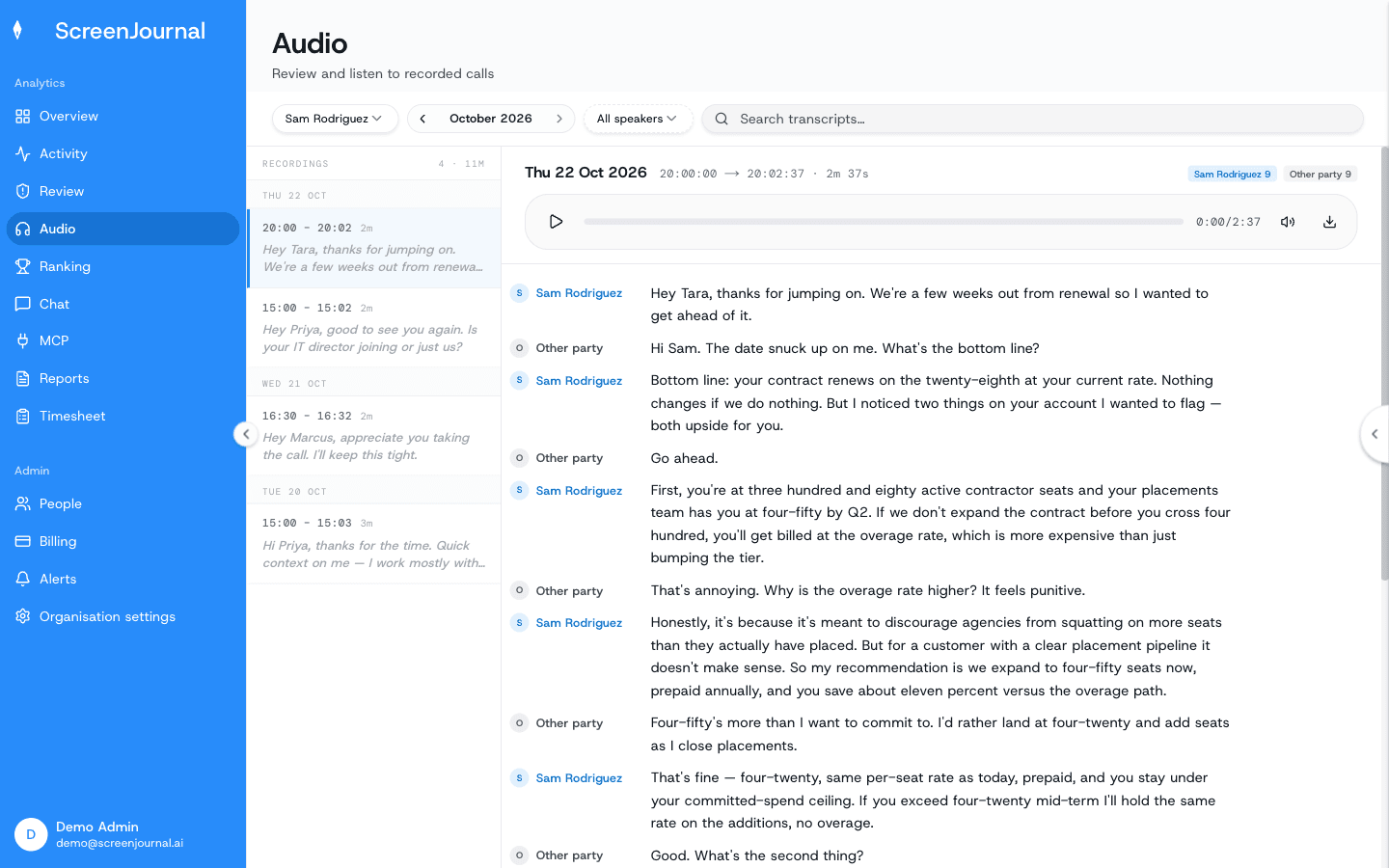
Audio holds call and meeting transcripts for members whose desktop policy records meeting audio. It's a two-pane reader: recordings on the left, the open transcript on the right.
When there is audio at all
Audio only exists when Organisation settings → Desktop policy → Meeting audio is set to Record + Transcribe + Save (audio file kept) or Record + Transcribe (transcript only, no playback). With Disabled (the default) the page stays empty. On the desktop, recording starts when a recognised meeting app opens the microphone and, where the policy lists webinar apps or sites, while one of those plays sound (the whole webinar, even if the member never speaks). Both lists are set by an admin in the desktop policy; members can't change them from the app.
Finding a recording
What you see: one filter row — a person selector, a month stepper with a year/month picker, a speaker filter (All speakers, the member's own name, or Other party) and a Search transcripts… box.
Below it the session rail lists every recording in that month under day headers, newest first. Each row shows the time range and duration; tags appear only when they mean something — "1 redacted", "6 hits" while searching, "no audio" when only the transcript survived.
Reading and listening
What you see: the reader header names the date, the exact time range, the duration and the speaker split, and carries the player. A recording is archived in 15-minute parts, but the player presents one continuous timeline with one progress bar, and a Download audio control saves the file. If the audio file wasn't kept the header shows "No archived audio for this recording — transcript only" instead of a dead player.
The transcript reads as a document, not a chat: the speaker label (the member's name or Other party) prints only when the speaker changes. Per-line timestamps and click-to-seek were removed in the current version because the transcription's segment times aren't accurate enough to show; the player's scrubber is the only position on the page.
Anything redacted appears as a neutral Content redacted block. If every recording in a month was redacted, the page says so and how many markers remain.
Searching
Type in Search transcripts… and the rail narrows to matching recordings with a hit count and the first matching snippet; the reader scrolls to and highlights the active match. The speaker filter applies to search too.
Who sees what
The same reach as everywhere else: your own recordings, your team's if you manage it, your reportees', or the whole organisation for org-wide roles. Times follow your display timezone.