Mouse jigglers and fake productivity
Mouse jigglers beat time trackers because time trackers measure motion, not work. The fix is not better jiggler detection, it is measuring output. ScreenJournal reads what was actually produced, so gaming a timer stops working and quiet high performers finally get recognised. Here is the honest picture, for managers and for employees.
Updated on 14 September 2026
What is a mouse jiggler?
A mouse jiggler is a device or app that simulates input so a computer looks active. Hardware versions plug in as a USB dongle and nudge the cursor. Software versions run in the background and generate movement or key presses. People use them to defeat idle detection and the activity percentages that time trackers score them on.
They are cheap, openly sold, and they boomed alongside remote work. Most people who use one are not trying to skip work altogether. They are usually responding to a measurement problem: tools that score keyboard and mouse motion treat reading, thinking, phone calls and whiteboard time as idleness. When honest work looks like slacking on the dashboard, some people start performing for the dashboard instead.
Why do mouse jigglers work on time trackers?
Because most time trackers estimate effort from input, not from work. Hubstaff, for example, documents that its activity percentage comes from keyboard and mouse input duration over tracked time. Monitask checks for input in ten minute blocks, and Time Doctor scores activity from input counts rather than content. None of this reads what was produced. A jiggler feeds exactly the signal these tools measure, so it earns a convincing score while nothing gets done, and a person deep in a contract review earns a terrible score while doing the most valuable work of the day.
The tools are not badly built. They are measuring a proxy, and motion was never the thing that mattered.
Are time trackers getting better at detecting jigglers?
Yes, and detection in 2026 is meaningfully better than the first wave. Hubstaff's Insights add-on flags apps that generate fake activity. Time Doctor's Unusual Activity Report uses pattern analysis to flag artificial input that does not look like a person working. Software jigglers, which run as apps, are the easiest to catch. Hardware dongles present to the computer as an ordinary mouse, but their machine-regular motion is precisely what pattern analysis targets. Behaviour varies by product and plan, but the direction is one way: detection is improving.
If you are reading this as an employee, the plain advice is: do not use one. Companies increasingly name fake-activity devices in policy, simulated activity is typically treated as misconduct, or as timesheet fraud where hours are billed, and there are publicly reported dismissals. A jiggler risks your job to defeat a metric that was mismeasuring you anyway. Raising the measurement problem openly is slower, but it is safer and it actually fixes something.
Detection cuts the other way too. Pattern analysis is probabilistic, and unusual but genuine ways of working can be flagged as suspicious, which puts honest employees under a cloud. An arms race between fake motion and motion forensics never lands on the thing that matters.
Who gets hurt when activity is the measure?
The best performers, first and worst. Activity metrics reward performative busyness: constant motion, quick app switching, an always-green status light. They punish concentration, because the person who solves the hard problem in two focused hours looks worse than the person who generated eight hours of movement. Over time this teaches a team the wrong job, which is to look busy rather than to be useful. Managers lose as well: once people learn the number can be gamed, the number stops meaning anything, and every report built on it inherits the doubt.
What should companies measure instead of activity?
Output: the work that actually got produced inside the hours. That is the problem ScreenJournal was built for.
ScreenJournal is an AI work visibility tool that reads on-screen work as it happens, turns it into a detailed timeline of what each person actually did, and then, by default, deletes the raw screen data. Timelines accumulate into a searchable chronicle of everyone's work history, and from them ScreenJournal generates timesheets and reports automatically and drafts standup summaries on request, answering questions about any of it in plain English.
It works in three steps. It reads screen activity as work happens. A frontier AI model analyses that activity to understand the work and measure output. By default the raw screen data is then deleted. Because measurement starts from what was produced, a mouse jiggler achieves nothing: hours of simulated motion generate a work timeline with no work in it, and two focused hours of real work show up as exactly that.
What does a ScreenJournal timeline look like?
Each entry on the Activity page records the work in plain English: the app it happened in, what was done, how long it took and a productivity score, with entries expanding to show context. Proof: the Activity page, one person's day as scored segments with the app, time range, duration and an AI-written description; hover a segment for Correct score, Play recording and Redact, each gated by role and policy.
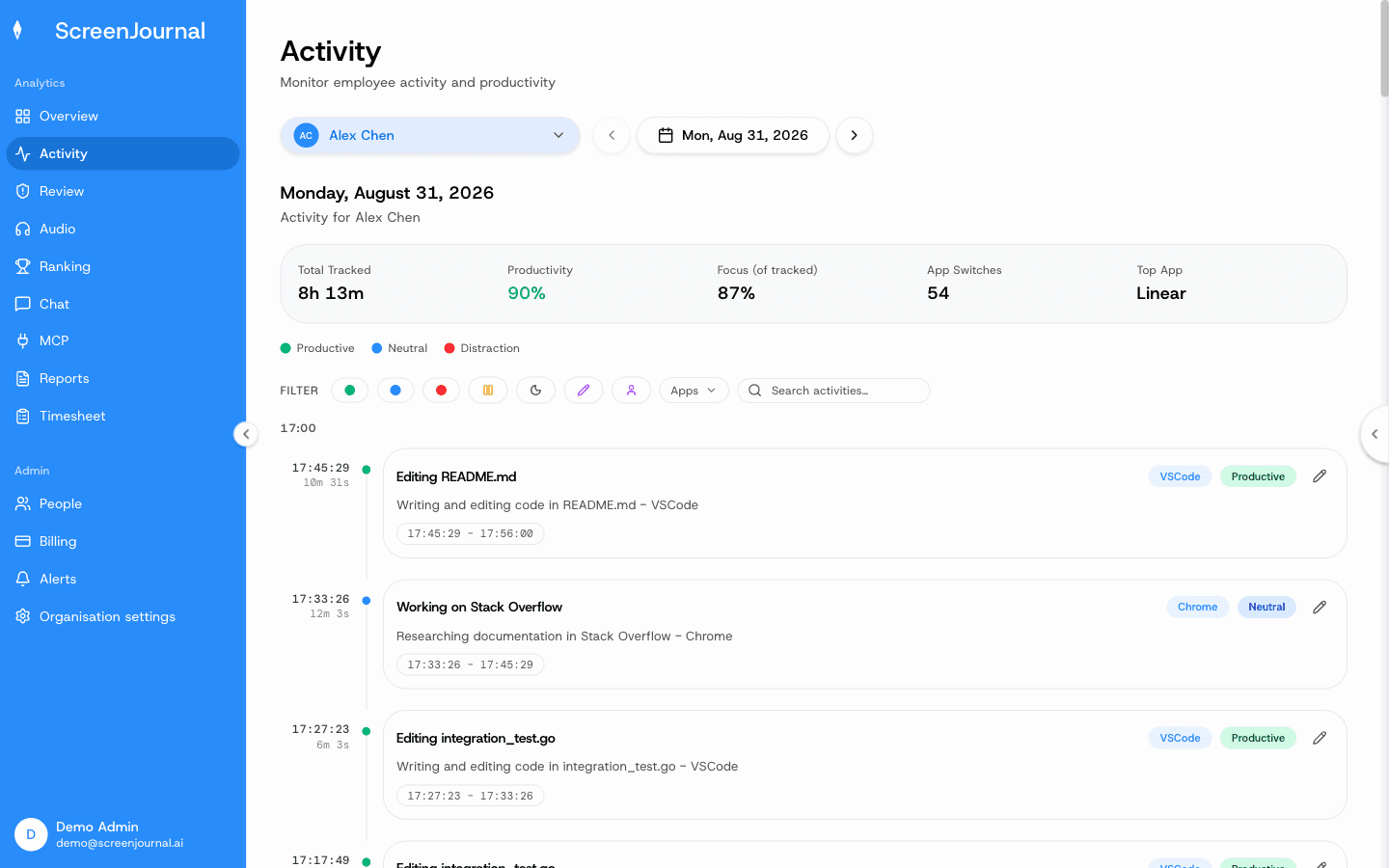
The measurement is designed to be checked rather than silently imposed. Employees see the same activity view managers do, an admin can correct any score the AI got wrong, and nudges are off until an admin writes an alert rule. Proof: the Activity page, one person's day as scored segments with the app, time range, duration and an AI-written description; hover a segment for Correct score, Play recording and Redact, each gated by role and policy.
What does ScreenJournal see, and what does it never see?
Plainly: ScreenJournal reads on-screen work as it happens and keeps the derived timeline. Apps and sites on the organisation's privacy exclusion list, such as banking, payroll, HR and health, are never captured. It takes no screenshots, and by default stores no video, because raw screen data is deleted during processing; a manager can opt in to keep video evidence (Evidence Mode), stored for up to 3 months. It does not log keystrokes. Employees can redact entries when the organisation allows it. Proof: the Activity page, one person's day as scored segments with the app, time range, duration and an AI-written description; hover a segment for Correct score, Play recording and Redact, each gated by role and policy.
Who is output measurement for?
Managers who suspect their activity numbers are lying to them, in any industry where work happens on a computer. And employees who are tired of performing busyness: output measurement is the version of visibility that finally works in favour of the quiet high performer. If you are weighing tools, the honest differences are set out in ScreenJournal vs screenshot trackers, and if you are an employee wondering what your employer can see today, start with can my employer see my screen.
FAQ
Does ScreenJournal detect mouse jigglers?
Yes, a suspected jiggler is flagged for review (detection is on by default, and it only counts as unproductive if the organisation turns that on), but ScreenJournal does not rely on that. It measures the work that was produced, not mouse and keyboard motion, so simulated activity earns nothing. Hours of faked motion show up as a timeline with no work in it, visible to the employee and the manager alike.
Can I be fired for using a mouse jiggler?
It is a real risk. Many companies treat simulated activity as misconduct, or as timesheet fraud where hours are billed, and there are publicly reported dismissals. If a bad metric is pushing you towards one, raising the measurement problem openly is the safer route.
Do people fake activity because they are lazy?
Usually not. Faking activity is mostly a rational response to being measured on motion. Reading, planning and calls score as idle, so people protect themselves. Fix the measurement and most of the incentive disappears.
Does ScreenJournal track mouse movement or keystrokes?
It does not log keystrokes and it does not score people on input activity. It reads the work itself on screen, measures what was produced, and by default deletes the raw screen data.
See the work itself, not screenshots of it
Timesheets, reports and answers from the work your team actually did. Available for Windows and macOS, with Linux and mobile support coming soon.