Are mouse jigglers detectable in 2026?
Increasingly, yes. Tracking vendors now ship detection features: Hubstaff's Insights add-on flags apps that generate fake activity, and Time Doctor's Unusual Activity Report uses pattern analysis to flag artificial input. Hardware jigglers are harder to spot than software ones, but the gap is closing, and companies increasingly treat jiggler use as serious misconduct.
Updated on 14 September 2026
How do trackers detect jigglers in 2026?
Two ways: recognising the tool, and recognising the motion. Software jigglers run as apps, so they can be identified directly, and Hubstaff's Insights add-on includes benchmarks that flag apps generating fake activity. Motion analysis goes further: real human input is irregular and simulated input is machine-regular, so Time Doctor's Unusual Activity Report flags input that does not look like a person working. Hardware dongles present to the computer as an ordinary mouse, defeating app scanning, but their repetitive motion is exactly what pattern analysis targets. Capabilities vary by product and plan, but the direction of travel is one way.
What happens if you are caught using one?
It is treated seriously, and increasingly named in policy. Simulated activity is typically handled as misconduct, and as timesheet fraud where hours are billed to clients, and there are publicly reported cases of employees dismissed for simulating keyboard activity. This page will not tell you how to avoid detection, because the honest advice is simpler: do not use one. If you are tempted because reading, thinking and calls score as idle time, the problem is the metric, and raising that openly is safer than gaming it. The wider incentive problem is covered in mouse jigglers and fake productivity.
One fairness note: pattern detection is probabilistic, and unusual but genuine ways of working can be flagged, so an arms race over motion hurts honest people too.
Why do jigglers stop mattering when output is measured?
Because a jiggler can fake motion but cannot fake work. ScreenJournal is an AI work visibility tool that reads on-screen work as it happens, turns it into a detailed timeline of what each person actually did, and then, by default, deletes the raw screen data. Timelines accumulate into a searchable chronicle of everyone's work history, and from them ScreenJournal generates timesheets and reports automatically and drafts standup summaries on request, answering questions about any of it in plain English.
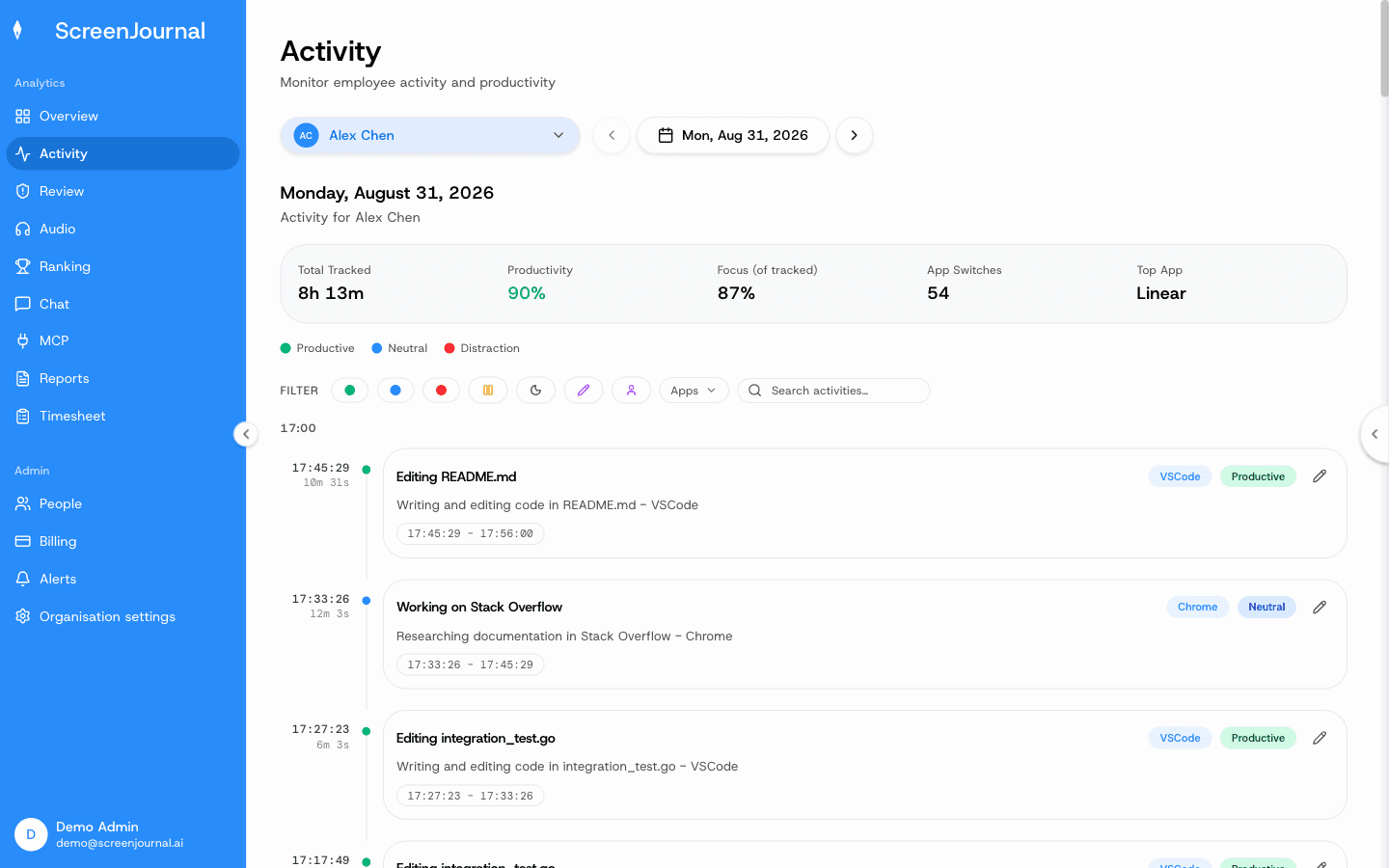
There is no activity percentage to game. Hours of simulated motion produce a work timeline with no work in it, while two focused hours of real work show up as real work. ScreenJournal sees on-screen work, with apps and sites on the privacy exclusion list never captured. It takes no screenshots, logs no keystrokes, and employees can redact entries on top when the organisation allows it. Recordings are not stored by default, because raw screen data is deleted during processing; a manager can opt in to keep video evidence through Evidence Mode, stored for up to 3 months. The contrast with motion-scoring tools is set out in ScreenJournal vs screenshot trackers. Proof: the Activity page, one person's day as scored segments with the app, time range, duration and an AI-written description; hover a segment for Correct score, Play recording and Redact, each gated by role and policy.
FAQ
Can hardware mouse jigglers be detected?
They are harder to detect than software jigglers because they present to the computer as an ordinary USB mouse, but the motion they produce is machine-regular, and pattern analysis such as Time Doctor's Unusual Activity Report is built to flag exactly that. Detection improves every year.
Does ScreenJournal flag mouse jigglers?
It flags suspected jigglers for review (detection is on by default, and a suspected jiggler only counts as unproductive if the organisation turns that on), but it does not rely on a jiggler detector. ScreenJournal measures what was produced rather than whether the mouse moved, so simulated activity earns nothing and simply shows up as time with no work in it.
See the work itself, not screenshots of it
Timesheets, reports and answers from the work your team actually did. Available for Windows and macOS, with Linux and mobile support coming soon.