Can my employer see my screen?
Only if software that can capture it is installed, which is common on company-owned devices. Screenshot trackers typically store periodic captures, and surveillance suites can record continuously or view live. On a personal device with nothing installed, generally no. ScreenJournal keeps no footage by default: managers see a derived timeline, and can replay a recording only where a manager has opted in to keep video evidence.
Updated on 14 September 2026
When can an employer actually see your screen?
When a monitoring agent is installed, almost always on a company-owned or company-managed device, and what it sees depends on the product. Screenshot trackers store periodic captures: Hubstaff typically takes up to three randomised screenshots per ten minutes, Time Doctor can capture screenshots and, on some plans, continuous screen video in three minute clips, and Insightful includes screenshots on its base plan. Surveillance suites such as Teramind typically record screens continuously. Per configuration, some of these tools also run silently. You are entitled to ask IT or HR exactly what is deployed and what it captures, and in many regions notice is required.
What can a manager see with ScreenJournal?
Not your screen itself by default, because there is normally no footage to look at. If a manager has opted in to keep video evidence (Evidence Mode), the people whose role already lets them see your activity can replay recordings, which are kept for up to 3 months. ScreenJournal is an AI work visibility tool that reads on-screen work as it happens, turns it into a detailed timeline of what each person actually did, and then, by default, deletes the raw screen data. Timelines accumulate into a searchable chronicle of everyone's work history, and from them ScreenJournal generates timesheets and reports automatically and drafts standup summaries on request, answering questions about any of it in plain English.
To be precise about the mechanism: ScreenJournal does record your screen, as short-lived video, but only to read the work from it. By default the video is deleted during processing and nobody can watch it back, because it no longer exists; recordings are disclosed at desktop sign-in, and there is no covert mode.
So a manager sees the derived record: the work timeline, timesheets and reports, and answers from the AI chat. There is no live view and no screenshot archive to scroll back through. You see the same activity view your manager does, apps and sites on the privacy exclusion list are never captured, PII is removed during processing, anything that slips through can be redacted when the organisation allows it, and keystrokes are never logged. A redacted entry is erased entirely and never appears in anyone's search; who may redact is a permission the organisation's administrators grant, and nobody has it until they do. Proof: the Activity page, one person's day as scored segments with the app, time range, duration and an AI-written description; hover a segment for Correct score, Play recording and Redact, each gated by role and policy.
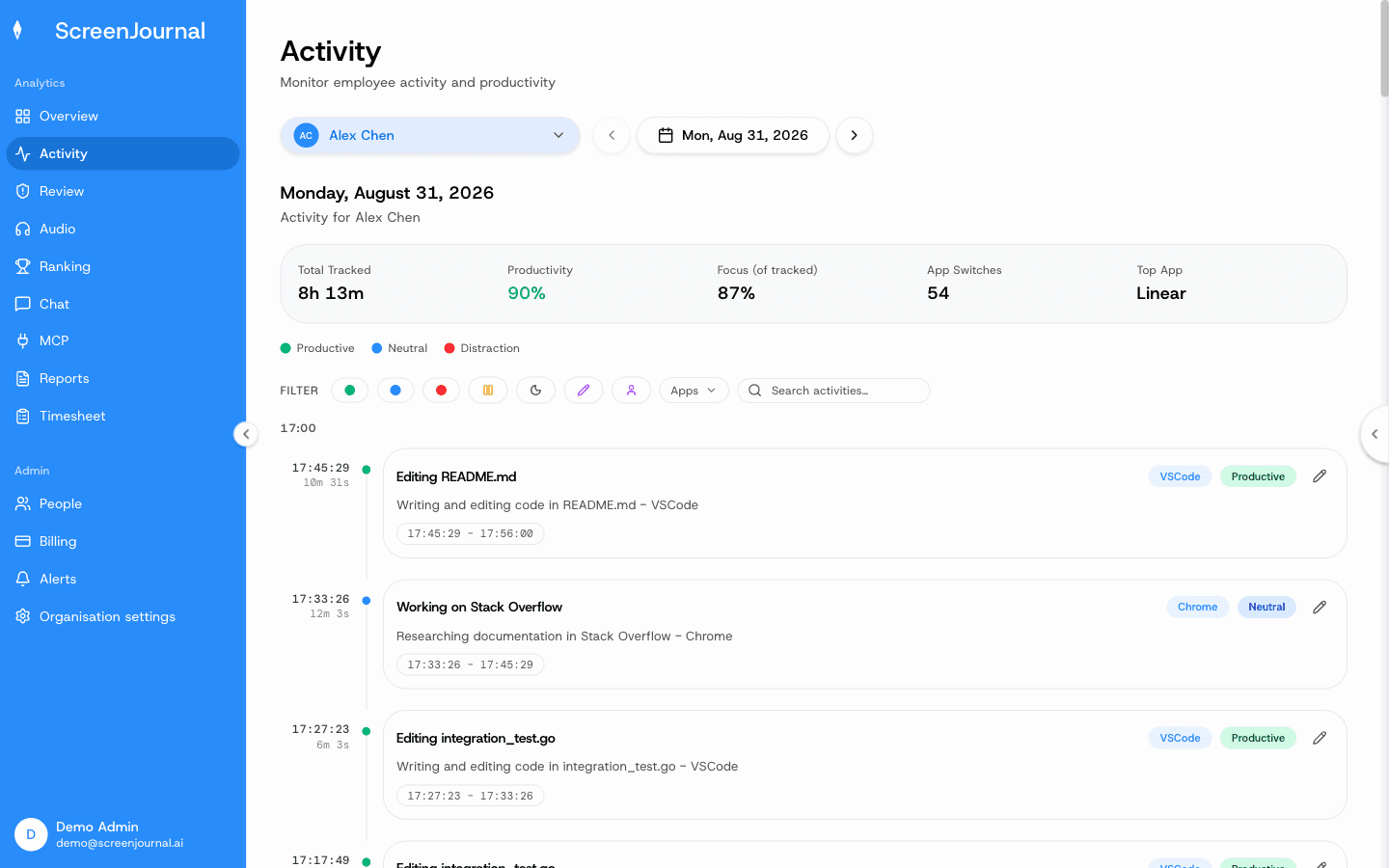
What should you assume on a work device?
The honest caveat: on a work device, assume your work activity is visible in some form even where no screenshots exist, because company networks, browsers and accounts keep their own records. The useful questions are what is stored, for how long, and who can see it. Asking them openly is reasonable, and a good employer can answer them. The differences between tools that store footage by default and tools that do not are laid out in ScreenJournal vs screenshot trackers.
FAQ
Can my employer watch my screen live?
With some surveillance products, typically yes on company devices. Screenshot trackers generally capture at intervals instead. ScreenJournal has no live view. It reads the work, writes the timeline, and by default deletes the raw screen data during processing; a manager can opt in to keep video evidence, stored for up to 3 months.
Can my employer see my personal laptop or phone?
Generally not, unless the device is enrolled in company management or has company software installed on it. Monitoring lives on the device, so a personal machine with nothing installed is outside its reach.
See the work itself, not screenshots of it
Timesheets, reports and answers from the work your team actually did. Available for Windows and macOS, with Linux and mobile support coming soon.