Does monitoring software record keystrokes?
Some does. Surveillance suites such as Teramind and Veriato typically log keystrokes, capturing what you actually type. Mainstream time trackers such as Hubstaff, Time Doctor, Insightful and Monitask count keyboard activity to build an activity percentage but do not record which keys you press. ScreenJournal does neither: it reads work output and never logs keystrokes.
Updated on 14 September 2026
Which tools record keystrokes and which only count them?
The table below summarises typical keystroke behaviour by tool category; where products vary by plan, read the rows as typical.
| Tool category | Keystroke behaviour |
|---|---|
| Surveillance suites (Teramind, Veriato) | Typically log keystroke content for investigation |
| Screenshot trackers (Hubstaff, Time Doctor, Insightful, Monitask) | Count input to score activity; do not record which keys are pressed |
| Activity analytics (ActivTrak) | No keystroke logging at any tier |
| ScreenJournal | No keystroke logging; measures the work itself, not input |
Why does the difference matter?
Keystroke logging captures everything typed on the machine: passwords, personal messages, a private search typed into the wrong window. It is the most invasive form of workplace monitoring, which is why it is largely confined to insider-threat tooling. Input counting keeps no content, but it drives the activity percentages that measure motion rather than work and invite gaming, the problem covered in mouse jigglers and fake productivity.
One honest nuance: a tool does not need a keylogger to end up holding what you typed. A stored screenshot shows whatever was on screen at the moment of capture, including the message you had just written. The question to ask is not only "does it log keys" but "does it keep images of my screen".
Does ScreenJournal record what I type?
No, in any mode, and it takes no screenshots for anyone to read your typing from either. ScreenJournal is an AI work visibility tool that reads on-screen work as it happens, turns it into a detailed timeline of what each person actually did, and then, by default, deletes the raw screen data. Timelines accumulate into a searchable chronicle of everyone's work history, and from them ScreenJournal generates timesheets and reports automatically and drafts standup summaries on request, answering questions about any of it in plain English.
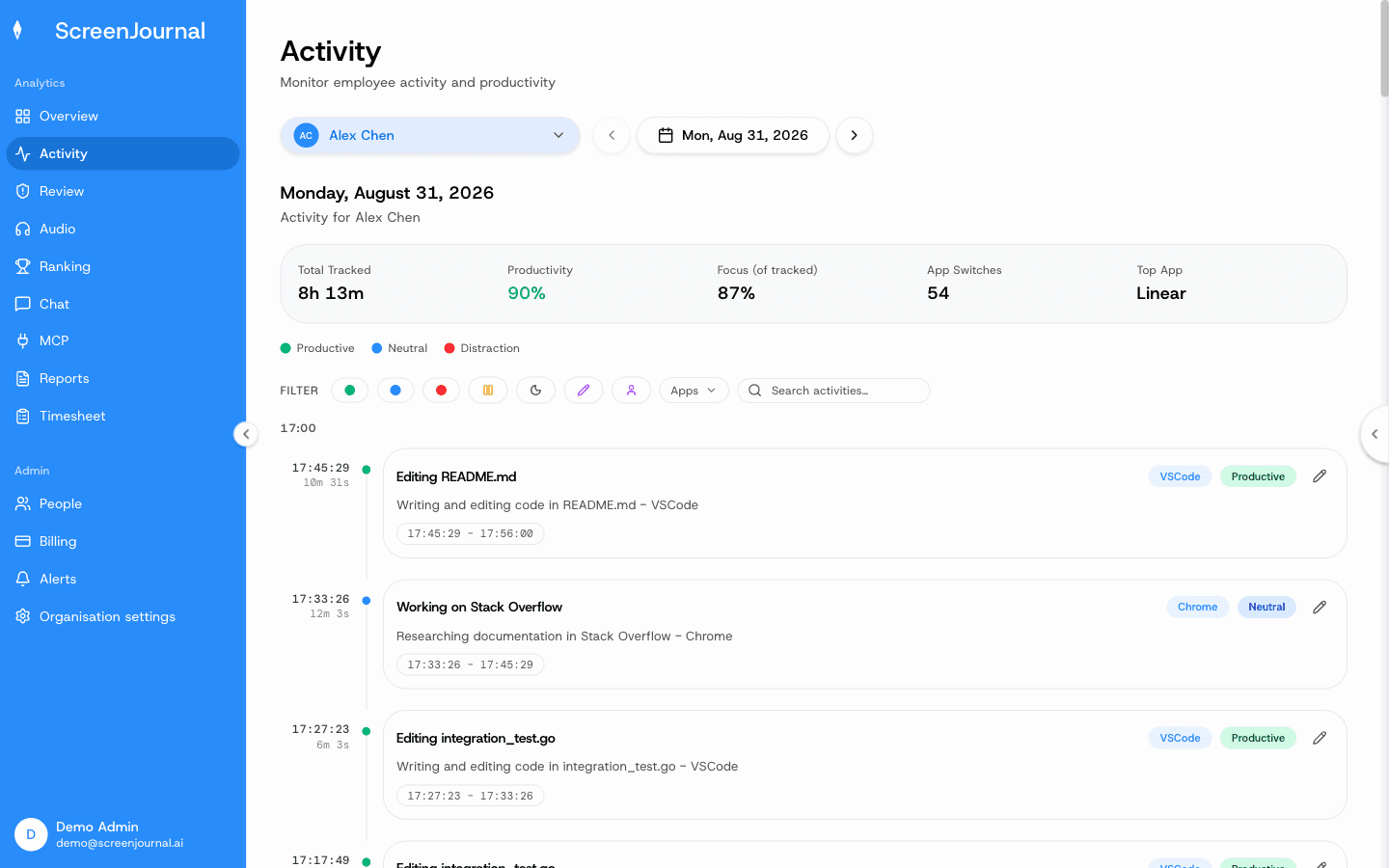
What a manager sees is the derived record: work timelines, timesheets and reports. By default raw screen data is deleted during processing (a manager can opt in to keep video evidence through Evidence Mode, stored for up to 3 months), PII is removed during processing, apps and sites on the privacy exclusion list are never captured, and you can redact anything when the organisation allows it. A redacted entry is erased entirely and never appears in anyone's search; who may redact is a permission the organisation's administrators grant, and nobody has it until they do. How this differs from investigation-first tooling is covered in ScreenJournal vs surveillance suites. Proof: the Activity page, one person's day as scored segments with the app, time range, duration and an AI-written description; hover a segment for Correct score, Play recording and Redact, each gated by role and policy.
FAQ
Can my employer see my passwords?
With a keystroke logger, anything typed can be captured, which is one reason such tools are legally sensitive. Screenshot tools do not log keys, but a stored capture can show text that was visible on screen. ScreenJournal logs no keystrokes and takes no screenshots, and by default raw screen data is deleted during processing; a manager can opt in to keep video evidence, stored for up to 3 months.
Do activity percentages record what I type?
No. They count whether input happened, not which keys were pressed, and trackers such as Hubstaff state that they do not record which keys are pressed. The count still drives an activity score, which is why motion-based scoring mismeasures real work.
See the work itself, not screenshots of it
Timesheets, reports and answers from the work your team actually did. Available for Windows and macOS, with Linux and mobile support coming soon.