ScreenJournal vs surveillance suites (Teramind, Veriato, Controlio)
Updated on 14 September 2026
Teramind, Veriato and Controlio are surveillance and insider-threat platforms. They typically record screens continuously, log keystrokes and archive communications so investigators can reconstruct events. ScreenJournal is built the other way round: it reads on-screen work, keeps a derived timeline and deletes the footage by default, with Evidence Mode, the optional Record + Save capture mode a company can enable for the teams that need replayable evidence, stored for up to 3 months.
What is a surveillance suite?
A surveillance suite is employee monitoring software built for security investigation rather than everyday management. Where a time tracker asks "was someone working", a surveillance suite asks "exactly what happened on this machine, and can we prove it". To answer that, these platforms typically store screen recordings, keystroke logs and monitored communications, then give a security or compliance team the tools to search and replay them. They are strongest in regulated environments with dedicated security staff, and heaviest for ordinary teams, because someone has to configure, store, secure and interpret everything they collect.
What does Teramind do?
Teramind is a user activity monitoring and insider-threat platform. It typically records the screen continuously, with live desktop viewing and history playback, and can instead be configured to record only around behaviour-rule violations. Its keystroke logger records what users type, including special keys, and can be suspended on chosen websites. Audio recording of microphones and speakers can be enabled per monitoring profile; it is off by default. Around the recording sit email and chat monitoring and rules that alert on risky behaviour, deployable in the cloud or on premises. The full ScreenJournal vs Teramind comparison covers it in detail.
What does Veriato do?
Veriato is an insider risk management and user activity monitoring platform. It typically captures screenshots continuously or on keyword and activity triggers, logs keystrokes including hidden characters and combinations, and monitors email, chat, web and application use. Its risk-scoring layer applies AI-driven behavioural analytics to flag risky users before an incident, and its activity record is pitched at workplace investigations.
What does Controlio do?
Controlio is a cloud-first employee monitoring tool that can also run on premises. Screen capture is optional: it typically takes periodic snapshots while a user is active and can record continuous screen video or stream the screen live. Its keystrokes report captures typed input including functional keys, and monitoring profiles can switch recording on when a behaviour rule is broken, which is its lighter-touch middle ground between always-on recording and none.
How is ScreenJournal different from employee surveillance software?
ScreenJournal keeps the understanding and, by default, discards the recordings, which is the opposite trade to a surveillance suite. ScreenJournal is an AI work visibility tool that reads on-screen work as it happens, turns it into a detailed timeline of what each person actually did, and then, by default, deletes the raw screen data. Timelines accumulate into a searchable chronicle of everyone's work history, and from them ScreenJournal generates timesheets and reports automatically and drafts standup summaries on request, answering questions about any of it in plain English. The one exception is Evidence Mode, an optional, disclosed insider-threat add-on a company can enable for the teams it chooses, keeping their recordings for up to 3 months.
That design changes who the tool is for. A surveillance suite produces an archive that a security team interprets; ScreenJournal produces answers that a manager, or the employee themselves, can use day to day. By default there is no footage library to secure or leak, and employees see the same activity view managers do, so observation is not one-way.
The table below compares what surveillance suites typically do with ScreenJournal's default behaviour and its optional Evidence Mode (Record + Save) capture mode.
| Surveillance suites | ScreenJournal (default) | ScreenJournal (Evidence Mode, optional) | |
|---|---|---|---|
| Screen recording | Typically continuous, archived for live view and playback | Read in the moment, then deleted | Recordings kept in ScreenJournal's cloud for up to 3 months; the clip behind a segment or an alert kept for replay |
| Keystroke logging | Typically yes | No | No |
| Who it covers | Often whole departments or companies | Everyone, privacy-first | Only the teams a company chooses, disclosed at sign-in |
| Policy violations | Flagged from recordings and rules | Plain-language alert rules, with the member's explanation reviewed by a manager | The same alerts, with the evidence clip kept for replay |
| Employee experience | Being recorded | Sees the same data managers see, can redact personal content when the organisation allows it; redaction erases the entry entirely | Disclosed elevated coverage for the role |
| Everyday management | Not the focus | Timelines, timesheets, reports, AI answers | The same, plus security review |
The everyday-management row is the practical difference. Surveillance suites are bought by security teams and rarely help a manager run a Tuesday. ScreenJournal is built for the Tuesday: what got done, what is slipping, what the timesheet should say, with security coverage reserved for the roles that justify it.
When is a surveillance suite the right choice?
Choose a surveillance suite when investigation is the job itself.
- You are required to keep continuous forensic recordings, and in some cases audio, for entire departments, typically for regulatory or contractual reasons.
- Insider-threat investigation is the tool's primary purpose and a dedicated security team will operate it.
- You need endpoint-level rules that intervene in the moment, for example blocking an action as it happens, across your riskiest systems.
These are real requirements in banking, defence and similar environments, and a purpose-built suite serves them better than a management tool with security features.
When is ScreenJournal the right choice?
Choose ScreenJournal when you want operational truth without running a surveillance archive.
- You want everyday visibility, accurate timesheets and reports generated from the work itself, and answers you can get by asking in plain English.
- You want one platform that stays privacy-preserving by default and keeps replayable recordings only for the teams you choose, rather than recording everyone to cover a handful of risks.
- You do not want a keystroke log or an always-on recording archive of your whole company, with everything that storing one implies for trust and security.
Because timelines accumulate into a searchable chronicle, the record also gives something back: employees and managers can search how work was actually done, which no recording archive makes practical.
Frequently asked questions
Does ScreenJournal have insider-threat detection?
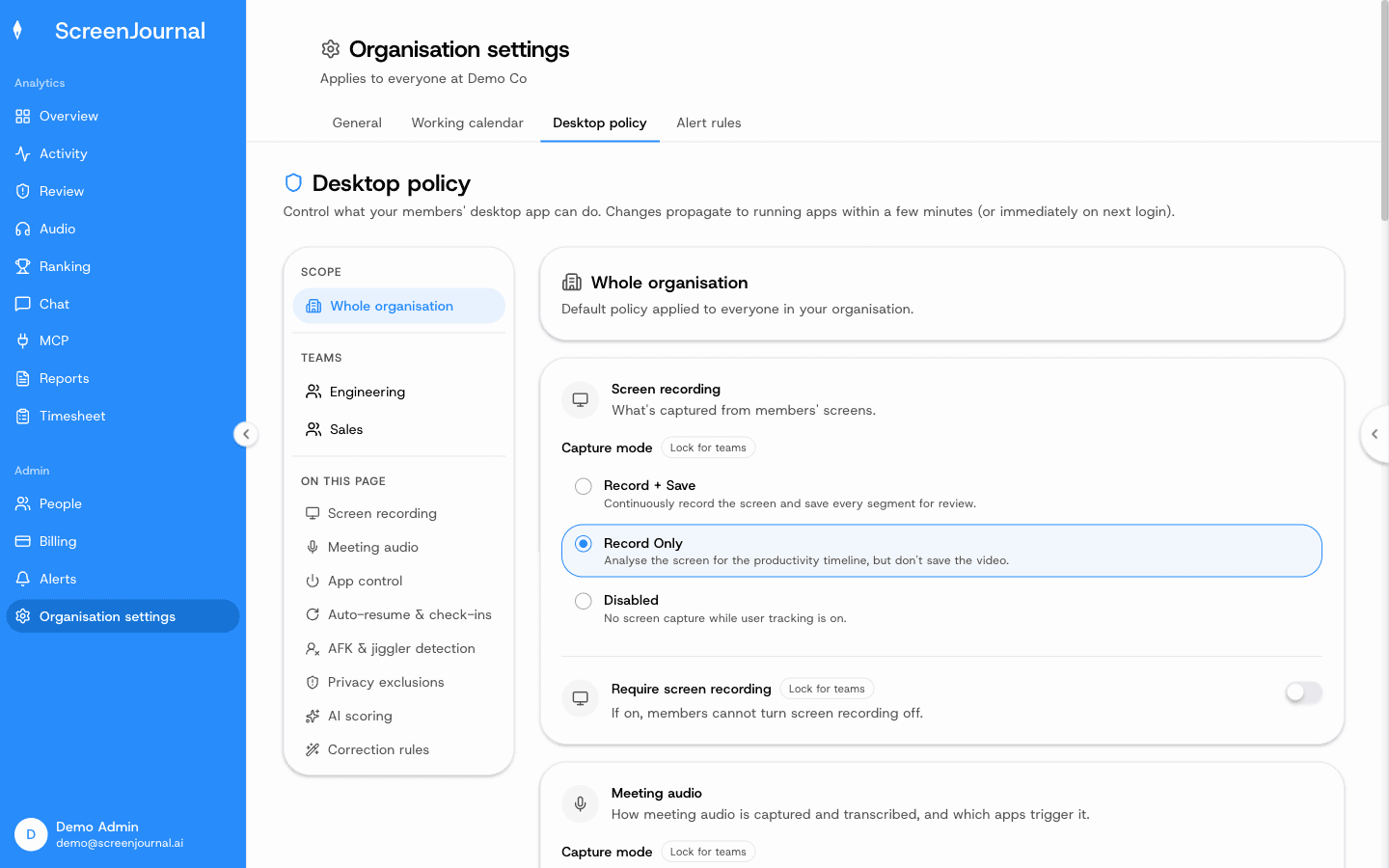
Yes, through Evidence Mode, the Record + Save capture mode a company can enable in its desktop policy, organisation-wide or for particular teams. When it is on, recordings are kept in ScreenJournal's cloud for up to 3 months, a Play recording action appears on timeline segments, and the clip behind an alert is kept for replay. When it is off, which is the default, raw screen data is deleted immediately during processing and only the derived timeline remains.
Does ScreenJournal log keystrokes in any mode?
No. ScreenJournal reads work output on screen, not keystrokes, and enabling Evidence Mode does not change that.
Can ScreenJournal catch policy violations without recording everyone?
Yes. An admin writes plain-language alert rules, for example "alert if someone exports customer records outside the CRM", and the AI checks them against each member's activity. A matching segment raises an alert the member must explain, and the evidence clip kept for it is exempt from redaction. Everything else follows the privacy-first flow, where excluded apps and sites are never captured, PII is removed and raw screen data is deleted by default.
Proof: Organisation settings → Desktop policy, where capture mode, meeting audio, privacy exclusions and correction rules are set for the organisation or a team.
Is ScreenJournal an alternative to Teramind, Veriato or Controlio?
For everyday work visibility, yes. ScreenJournal replaces the management side of these tools with timelines, timesheets, reports and AI answers, and covers teams that need replayable evidence through Evidence Mode, its Record + Save capture mode. Teams that need continuous forensic recording of whole departments are better served by a dedicated surveillance suite.
Whichever tool you are weighing, ask one question: when you need an answer about work, does the tool give you the answer, or footage to interpret? Surveillance suites give a security team an archive to reconstruct events from, and sometimes that is exactly what is required. For everything else, ScreenJournal reads the work, answers the question and, by default, keeps no footage to interpret.
See the work itself, not screenshots of it
Timesheets, reports and answers from the work your team actually did. Available for Windows and macOS, with Linux and mobile support coming soon.