ScreenJournal vs Teramind
Updated on 8 October 2026
Teramind is a surveillance and insider-threat platform: it typically records screens continuously, logs keystrokes and can capture audio, building an archive investigators can replay. ScreenJournal is an AI work visibility tool: it reads on-screen work, writes a timeline of what was done, then deletes the raw screen data by default. They solve different problems.
What is Teramind?
Teramind is a user activity monitoring platform built for security, compliance and insider-threat teams. It typically records the screen continuously, offering live desktop viewing and history playback, with recording resolution and retention set per deployment. It can instead be configured to record only in the minutes around a behaviour-rule violation, which is its privacy-friendlier setting. Its keystroke logger records what users type and where, including words, phrases and special keys, and can be suspended on chosen websites. Audio recording can be enabled per monitoring profile and then captures input and output devices such as microphones and speakers, including calls routed through the computer; it is off by default. Around that capture layer sit email and chat monitoring and behaviour rules that can alert on or respond to risky activity, deployable in the cloud or on premises. It is a serious, capable product for the problem it targets: reconstructing and preventing security incidents.
How is ScreenJournal different from Teramind?
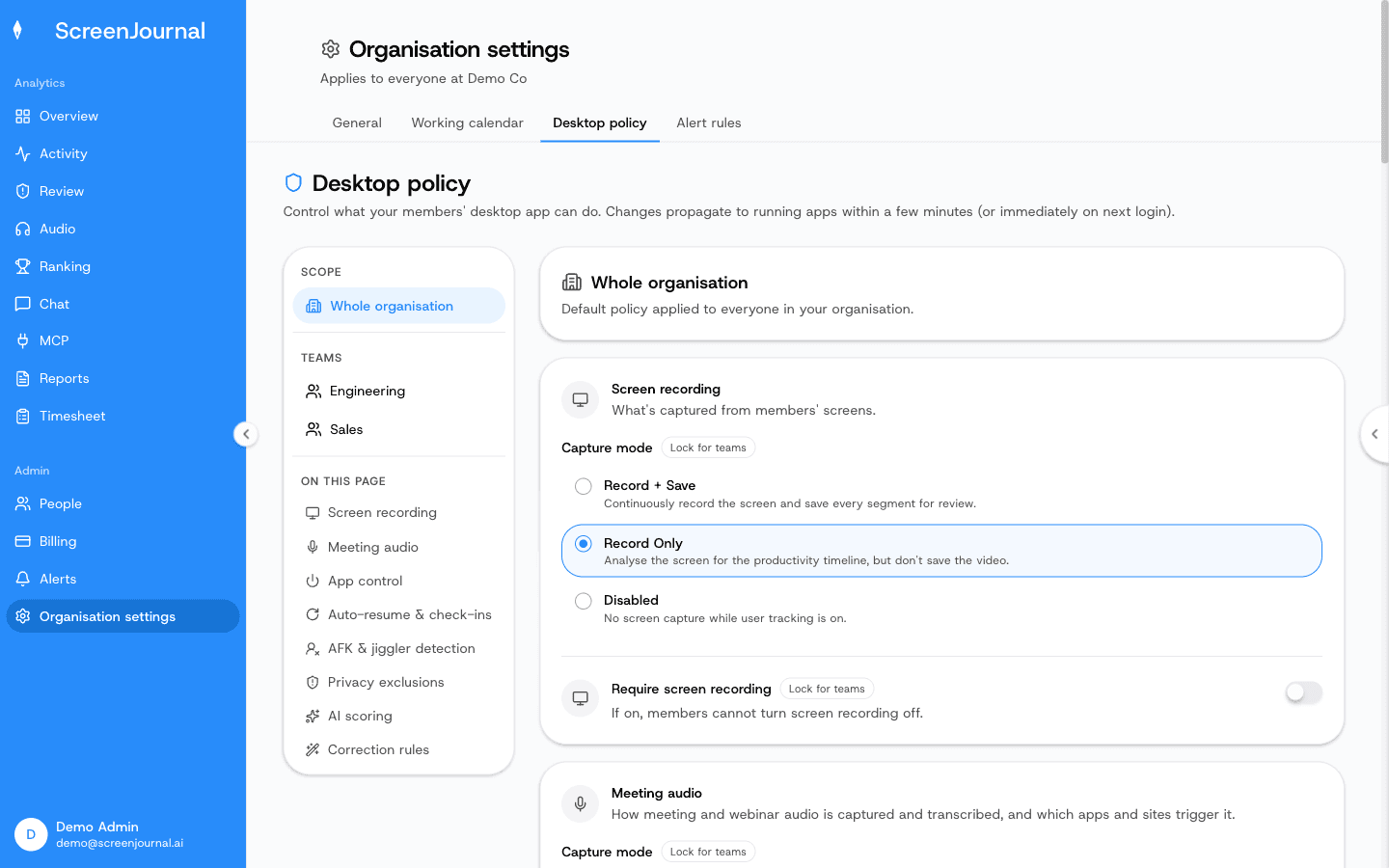
ScreenJournal keeps the understanding and, by default, deletes the recordings, where Teramind's value is the recordings themselves. ScreenJournal is an AI work visibility tool that reads on-screen work as it happens, turns it into a detailed timeline of what each person actually did, and then, by default, deletes the raw screen data. Timelines accumulate into a searchable chronicle of everyone's work history, and from them ScreenJournal generates timesheets and reports automatically and drafts standup summaries on request, answering questions about any of it in plain English. The one exception is Evidence Mode, the Record + Save capture mode a company can enable in its desktop policy for the whole organisation or for particular teams, keeping those teams' recordings for up to 3 months.
In practice the two tools sit in different rooms. Teramind lives with the security team, which searches and replays its archive when something needs investigating. ScreenJournal lives with managers and employees: the work timeline shows what got done, the timesheet prepares itself, and questions get answered by asking, not by scrubbing through footage.
This table summarises the honest differences between the two.
| Teramind | ScreenJournal | |
|---|---|---|
| What it captures | Screen video, typically continuous or around rule violations, plus keystrokes, email and chat, and optionally microphone and speaker audio | On-screen work activity, read by AI in the moment, plus meeting, call and listed-webinar audio with disclosed recording; excluded apps and sites never captured |
| What it stores | Recordings and activity logs, retained per configuration for playback and investigation | Derived timelines by default; raw screen data is deleted during processing unless Evidence Mode keeps it, for up to 3 months, while meeting and call recordings are kept and employees can redact call entries |
| How you get answers | Live view, session playback, reports and alerts a person interprets | Ask the AI chat or MCP and get a plain-English answer from the derived record |
| Employee privacy | Being recorded, with privacy depending on how monitoring is configured | PII removed during processing, employee redaction that erases the entry entirely, no stored footage by default; employees see the same view managers do |
| Searchable history | Archives searchable by user, time and logged activity | A chronicle searchable by meaning, like "the invoice bug in March" |
| Best for | Security teams running insider-threat investigation and compliance surveillance | Managers who want everyday operational truth, timesheets and reports without an archive |
The storage row carries most of the weight. An archive of recordings is an asset for investigators and a liability for everyone else: it has to be retained, secured and access-controlled, it can catch personal moments that were never the point, and it grows into exactly the kind of data store privacy regulation scrutinises. A derived timeline holds what a manager actually uses, what was done, in which app, for how long and to what effect, with no copy of the screen behind it by default. That is also why the two tools feel so different to the people being measured. With ScreenJournal, employees see the same activity view managers do, can redact segments when the organisation allows it, and, outside Evidence Mode, are not working in front of a recorder. A redacted entry is erased entirely and never appears in anyone's search; who may redact is a permission the organisation's administrators grant, and nobody has it until they do.
When is Teramind the right choice?
Choose Teramind when forensic capability is the actual requirement.
- You are obliged, by regulation or contract, to keep continuous recordings of screens, and in some configurations audio, for defined teams.
- You have a dedicated security function whose job is investigating incidents, and session playback and keystroke evidence are what it needs.
- You want endpoint rules that can respond to risky actions as they happen across high-risk systems.
If those describe your environment, a purpose-built surveillance platform is the honest recommendation, and Teramind is one of the most established.
When is ScreenJournal the right choice?
Choose ScreenJournal when the goal is knowing and improving how work gets done, not archiving it.
- You want timesheets and Excel reports generated from real work, standup drafts on request, and plain-English answers about progress on demand.
- You care about employee trust: no keystroke log in any mode, no stored footage by default, personal activity skipped, and redaction in the employee's hands.
- You need replayable recordings for a few teams, not a recording archive of the whole company; the optional Evidence Mode (Record + Save) capture mode covers those teams while everyone else stays on the privacy-first default.
There is also a benefit no surveillance archive delivers in practice. Because every timeline feeds the chronicle, choosing ScreenJournal builds a searchable history of how work was actually done: an employee can find how they solved a problem last quarter, and a colleague can learn how another team gets things done, just by asking. A recordings archive technically contains that history, but nobody can use hours of footage that way.
Frequently asked questions
Is ScreenJournal a good Teramind alternative?
For everyday work visibility, timesheets and reports, yes. ScreenJournal answers management questions without storing recordings by default, and its optional Evidence Mode (Record + Save) capture mode keeps replayable recordings, for up to 3 months, for the teams that need them. If the job is continuous forensic surveillance of whole departments run by a dedicated security team, Teramind is purpose-built for that.
Does ScreenJournal record audio like Teramind?
Both can record audio, in different scopes. ScreenJournal has no ambient microphone mode. It records meetings and calls in listed apps, where participants know recording is standard practice, and whole webinars in any webinar apps or sites an admin lists, keeps those recordings, and recording is agreed explicitly, by an owner or admin accepting the Call-Recording Addendum when audio is enabled and by every member acknowledging the Workplace Monitoring Notice at desktop sign-in; employees can switch call capture off unless the policy requires it, and can redact call entries when the organisation allows it. Teramind can typically record audio from input and output devices such as microphones and speakers once the feature is enabled in its monitoring settings; it is off by default.
Does ScreenJournal log keystrokes like Teramind?
No, in any mode. ScreenJournal reads the work produced on screen rather than the keys pressed. Teramind's keystroke logger typically records what users type, including special keys, though it can be suspended on chosen websites.
Can ScreenJournal detect insider threats like Teramind?
Partly, and by design only where justified. Policy violations are caught by plain-language alert rules the AI checks against each member's activity; a match raises an alert the member must explain, and the clip kept as evidence is exempt from redaction. For teams whose desktop policy keeps recordings (Record + Save, the Evidence Mode described on this site), those clips can be replayed from the Alerts log. ScreenJournal does not offer keystroke capture, and it does not have to record an entire workforce to do this.
Proof: Organisation settings → Desktop policy, where capture mode, meeting audio, privacy exclusions and correction rules are set for the organisation or a team.
Whichever way you are leaning, ask one question: when you need an answer about work, does the tool give you the answer, or footage to interpret? Teramind gives a security team an archive to reconstruct events from, and for genuine surveillance requirements that is the point. ScreenJournal reads the work, gives the answer and, by default, keeps no footage, which is what most teams actually need on an ordinary working day. For the category-level view, see ScreenJournal vs surveillance suites.
See the work itself, not screenshots of it
Timesheets, reports and answers from the work your team actually did. Available for Windows and macOS, with Linux and mobile support coming soon.