How to tell if your work computer is monitored
The reliable way is to ask. Check your contract, your IT or acceptable-use policy and any consent forms, and put the question to IT or HR directly, since many regions require employers to give notice. You can also look for monitoring agents on the machine itself, but some tools are designed to stay hidden.
Updated on 14 September 2026
Where should you look before touching the computer?
Paperwork first. Employment contracts, IT and acceptable-use policies and consent forms usually say whether monitoring software is used and what it collects, because in many regions employers are required to disclose it. If the documents are silent, ask IT or HR plainly: what is installed on my machine, what does it capture, and who can see it. That is a normal question, and in many places one the employer is obliged to answer.
What can you check on the machine itself?
Three places. Running apps: many trackers show a tray or menu bar icon and appear in the list of running processes. Installed software: check the installed-programs list for known monitoring products. Management profiles: a company-managed device often carries a device-management profile used to install software remotely.
The caveat: a clean-looking machine proves nothing, because some products are built to be invisible. Insightful offers a stealth mode with no tray icon, Monitask sells a separate stealth edition that installs under the name "Deskcap", Time Doctor has a silent mode for company devices, and Hubstaff has a silent app for some customers. That is why the paperwork and the direct question, not the system tray, are the dependable route.
How would you know if ScreenJournal was on your computer?
You would be told, and you would see your own record. ScreenJournal is an AI work visibility tool that reads on-screen work as it happens, turns it into a detailed timeline of what each person actually did, and then, by default, deletes the raw screen data. Timelines accumulate into a searchable chronicle of everyone's work history, and from them ScreenJournal generates timesheets and reports automatically and drafts standup summaries on request, answering questions about any of it in plain English.
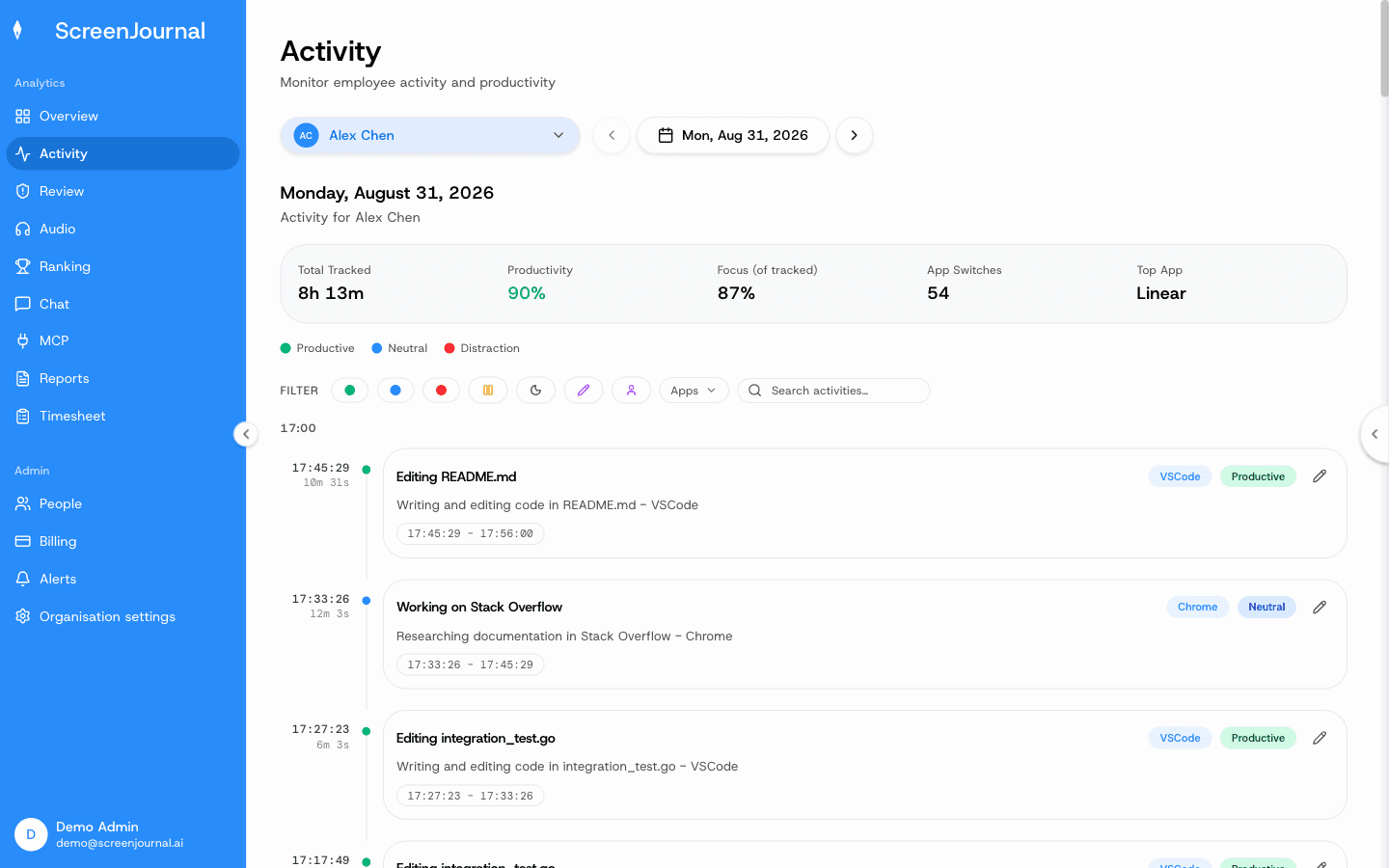
Visibility runs both ways by design. Employees see the same activity view managers do, so your own work timeline shows you exactly what has been derived from your work. Apps and sites on the privacy exclusion list are never captured, you can redact entries when the organisation allows it, keystrokes are never logged, no screenshots are taken, and by default no video is kept, because raw screen data is deleted during processing; a manager can opt in to keep video evidence (Evidence Mode), stored for up to 3 months, and recordings are disclosed at desktop sign-in. A redacted entry is erased entirely and never appears in anyone's search; who may redact is a permission the organisation's administrators grant, and nobody has it until they do. How that compares with tools that store captures is set out in ScreenJournal vs screenshot trackers. Proof: the Activity page, one person's day as scored segments with the app, time range, duration and an AI-written description; hover a segment for Correct score, Play recording and Redact, each gated by role and policy.
If you do find monitoring you were never told about, raise it with HR. Undisclosed monitoring is restricted in some regions, and at minimum it is a trust problem. This is general information, not legal advice.
FAQ
Can monitoring software be completely invisible?
Some products offer stealth or silent modes on company devices, with no icon and no obvious process name. That is why checking the machine is never conclusive, and the policy documents and a direct question to IT are the dependable route.
Is it OK to ask my employer whether I am monitored?
Yes. In many regions employers are required to give notice of monitoring, and everywhere it is a fair question about your own working conditions. A clear answer costs a good employer nothing.
See the work itself, not screenshots of it
Timesheets, reports and answers from the work your team actually did. Available for Windows and macOS, with Linux and mobile support coming soon.