ScreenJournal for BPOs and call centres
Updated on 14 September 2026
BPOs sell verified work, and clients ask for proof. The usual answer is a screenshot archive: thousands of captures per agent per month that someone must store, secure and scroll. ScreenJournal replaces that with AI-written timelines of what each agent actually did, billed accurately, with no footage kept by default.
Why is proof of work such a problem for BPOs?
Because a BPO bills clients for its people's time, every invoice is a claim about work the client never saw. The industry's standard evidence is the screenshot archive and the activity percentage, and both are weak exactly where billing disputes are decided: they show that someone was present and active, not what was done.
The costs compound from there. A capture every few minutes becomes thousands of screenshots per agent every month, which someone has to store, secure and, when a client pushes back, actually review. Archives of agent screens are a liability in an industry that handles other people's customer data: they can catch customer details mid-call, and they persist long after the work is finished. And agents feel the difference between being measured and being watched, which matters in a sector where attrition is already expensive.
How does ScreenJournal prove agent work without screenshots?
It reads the work itself and writes the evidence down. ScreenJournal is an AI work visibility tool that reads on-screen work as it happens, turns it into a detailed timeline of what each person actually did, and then, by default, deletes the raw screen data. Timelines accumulate into a searchable chronicle of everyone's work history, and from them ScreenJournal generates timesheets and reports automatically and drafts standup summaries on request, answering questions about any of it in plain English.
For a BPO, that means every agent's day becomes a work timeline: a per-session record where each entry carries the app, a plain-English description of what was done, how long it took and a productivity score, and expands for context. A supervisor or an account manager reads what happened; nobody scrolls captures. Proof: the Activity page, one person's day as scored segments with the app, time range, duration and an AI-written description; hover a segment for Correct score, Play recording and Redact, each gated by role and policy.
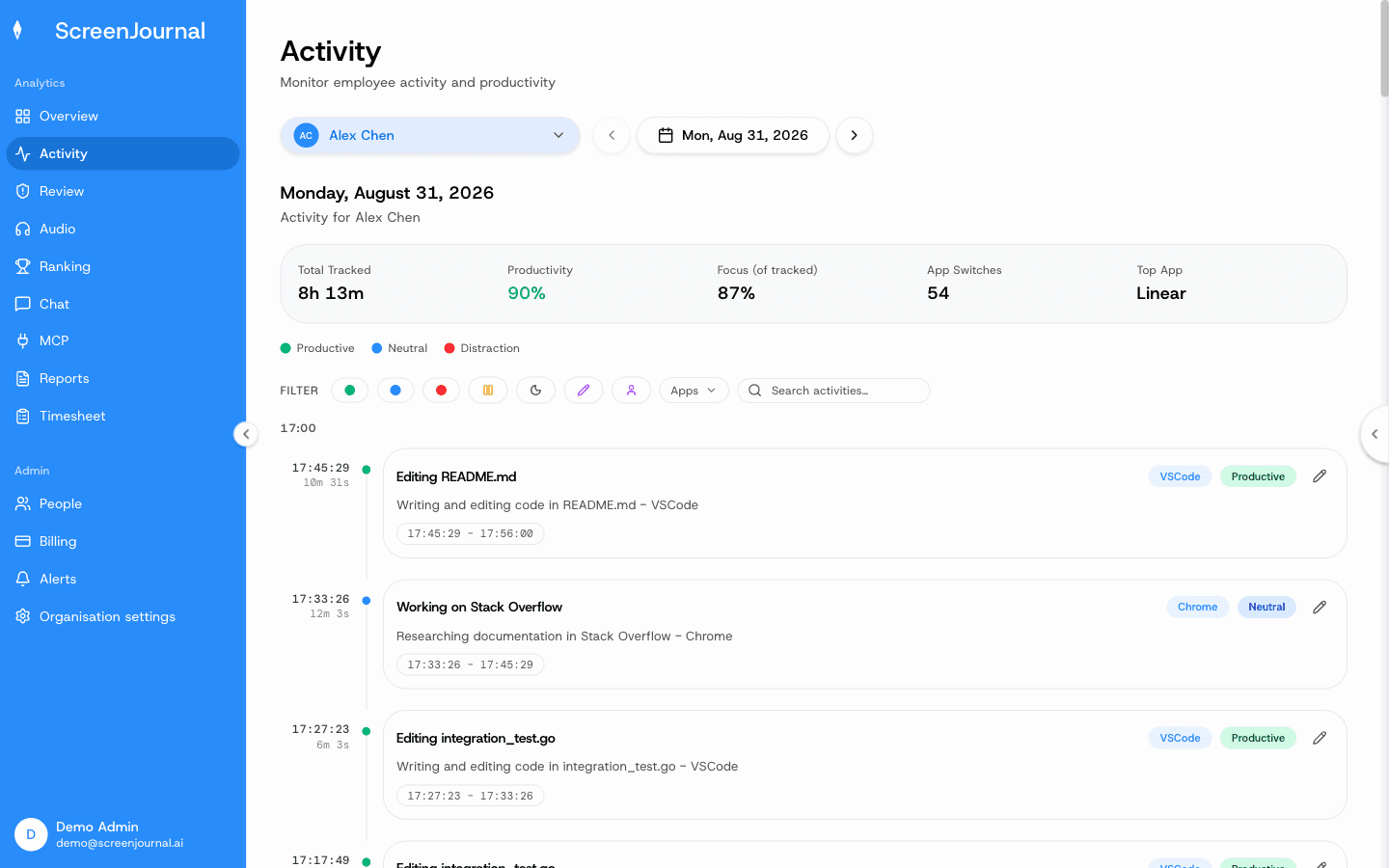
There is no screenshot archive because no screenshots are taken: by default raw screen data is deleted immediately during processing, so there is no image store to secure, breach or hand over. Where a manager needs video evidence they can opt in to keep the recordings (Evidence Mode), and those recordings are stored for up to 3 months. Apps and sites on the organisation's privacy exclusion list, such as banking, payroll, HR and health, are never captured.
The table below maps the questions clients actually ask to what a BPO running ScreenJournal shows them.
| What the client asks | What you show them |
|---|---|
| Did agents work the hours on this invoice? | Per-session timelines with durations and scores for each billed day |
| What were they actually doing? | Plain-English timeline entries, app by app |
| Can you evidence this disputed day? | The Timesheet's Details view, which lists that day's segments with time, activity and score |
| How is the account trending? | The Overview dashboard, the weekly Ranking and the Excel reports |
Proof: the Reports page, with the report chooser, scope and date range, and a live preview of the workbook before download.
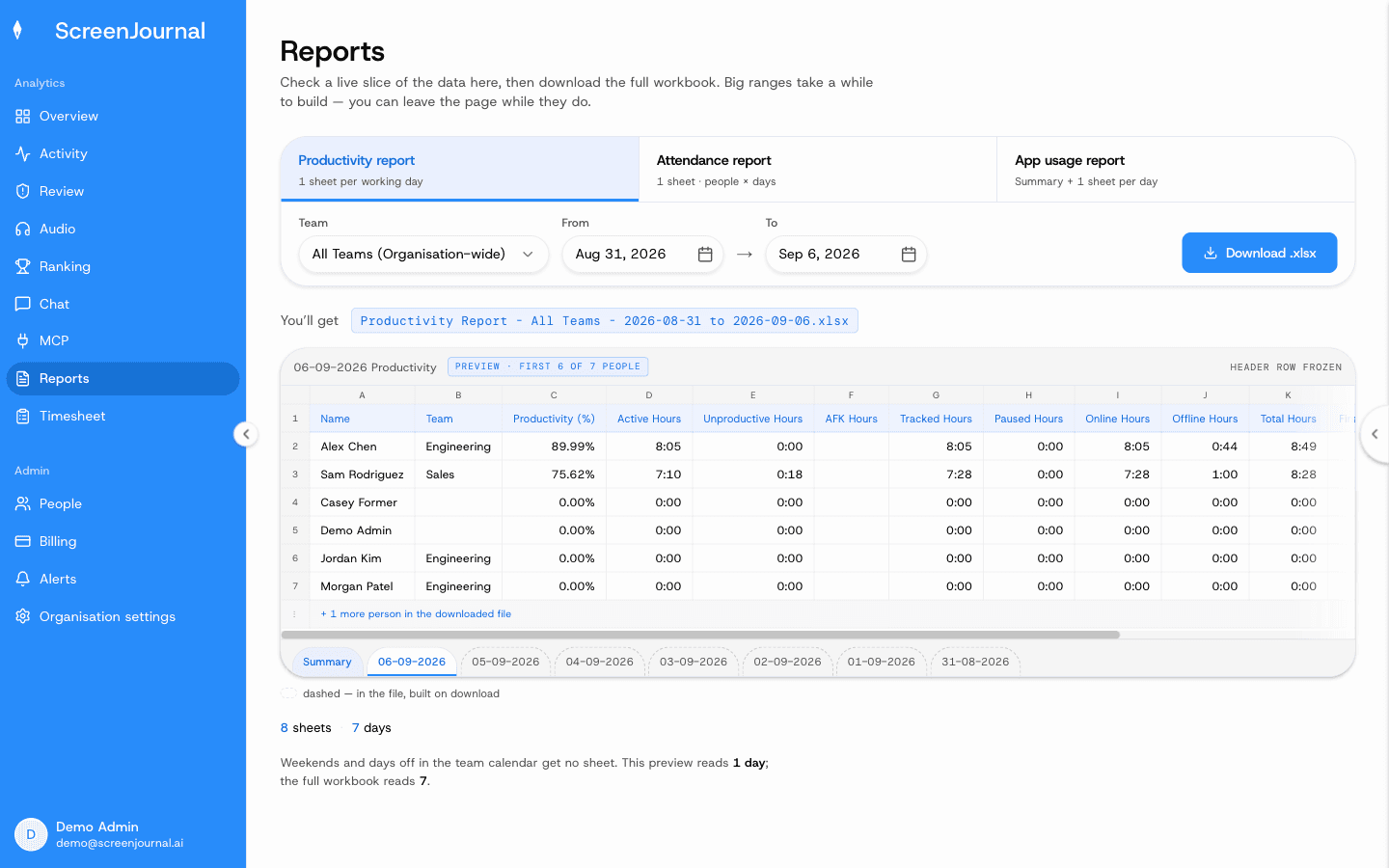
How do BPO timesheets and billing work?
Timesheets are computed from tracked hours rather than assembled from timers: billable hours, overtime, days worked and the amount due, per person, per week or month. Each day opens into the segments behind it, any day or segment can be excluded before the invoice goes out, and the period exports as CSV. Proof: the Timesheet page, with billable hours, overtime, days worked and amount due for one person and a row per day that opens into its segments.
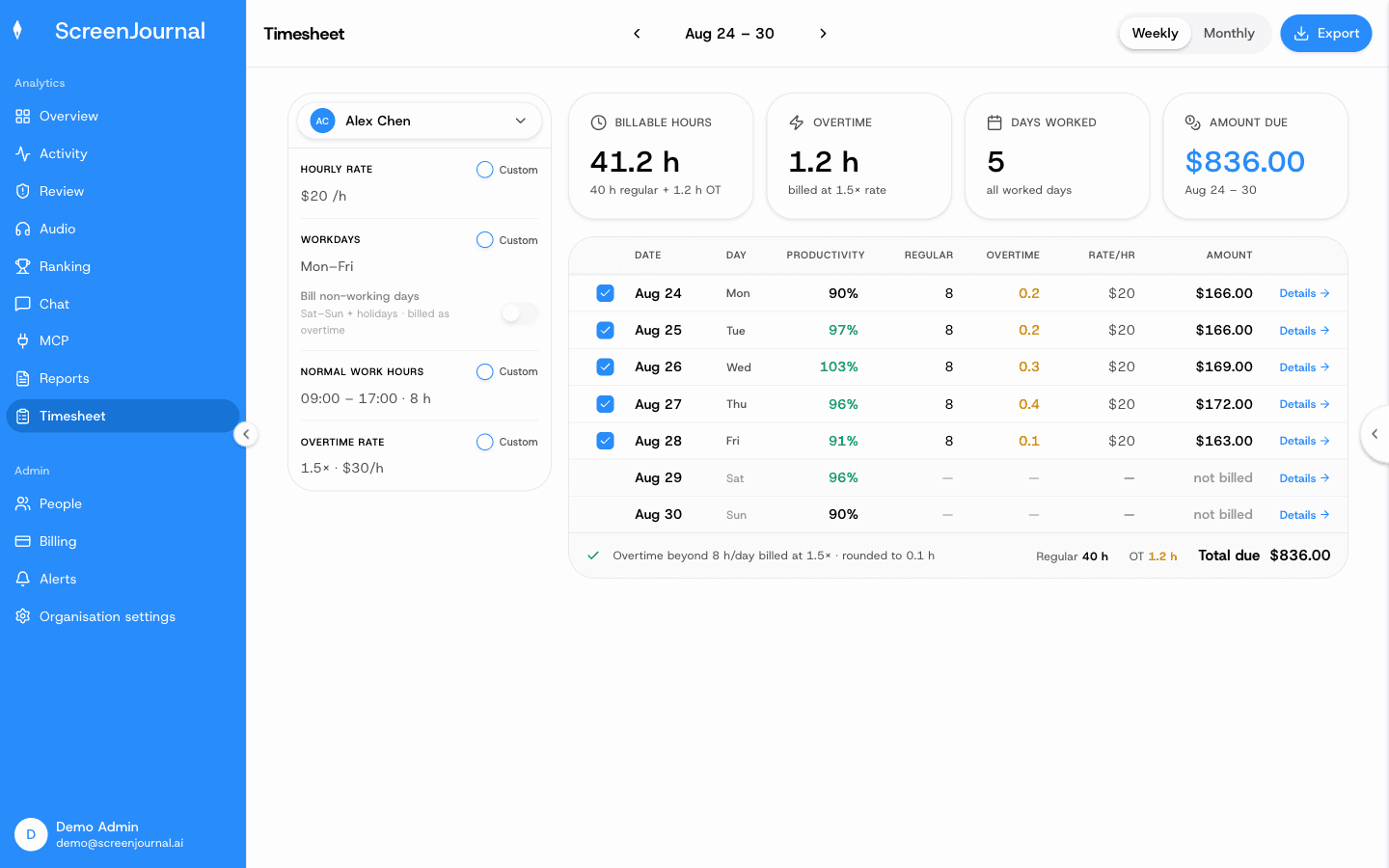
That changes the shape of a billing dispute. Instead of defending an activity percentage, the account team opens the line, shows the entries behind it and answers the question directly. It also changes the daily overhead: agents do not reconstruct their day, and team leads do not audit timers.
What does the chronicle add for a call centre?
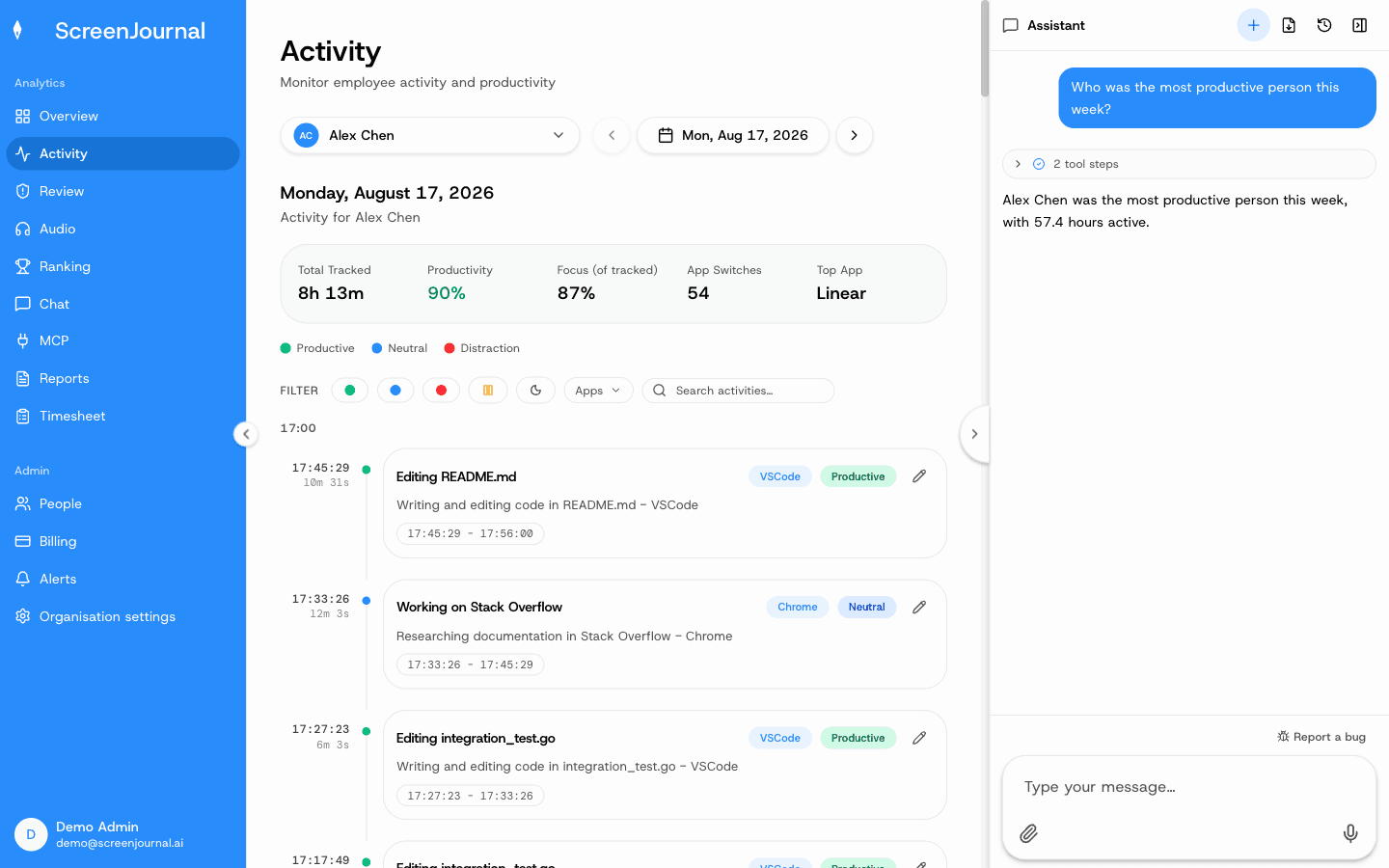
The chronicle keeps each agent's derived work history searchable, which turns two chronic BPO problems, attrition and late disputes, into something manageable. When a client questions work from months ago, the answer is a search rather than an archaeology project. When a strong agent leaves, how they actually handled the hard cases stays findable, and new agents can learn from it. Questions are asked through the ScreenJournal chat or MCP, and answers are permission-scoped by role, so a team lead sees their team and an agent sees their own history. Entries an agent has redacted are erased entirely, so they never appear in anyone's search. Proof: the Assistant chat (Ask AI) open beside the dashboard, showing the data it consulted before answering.
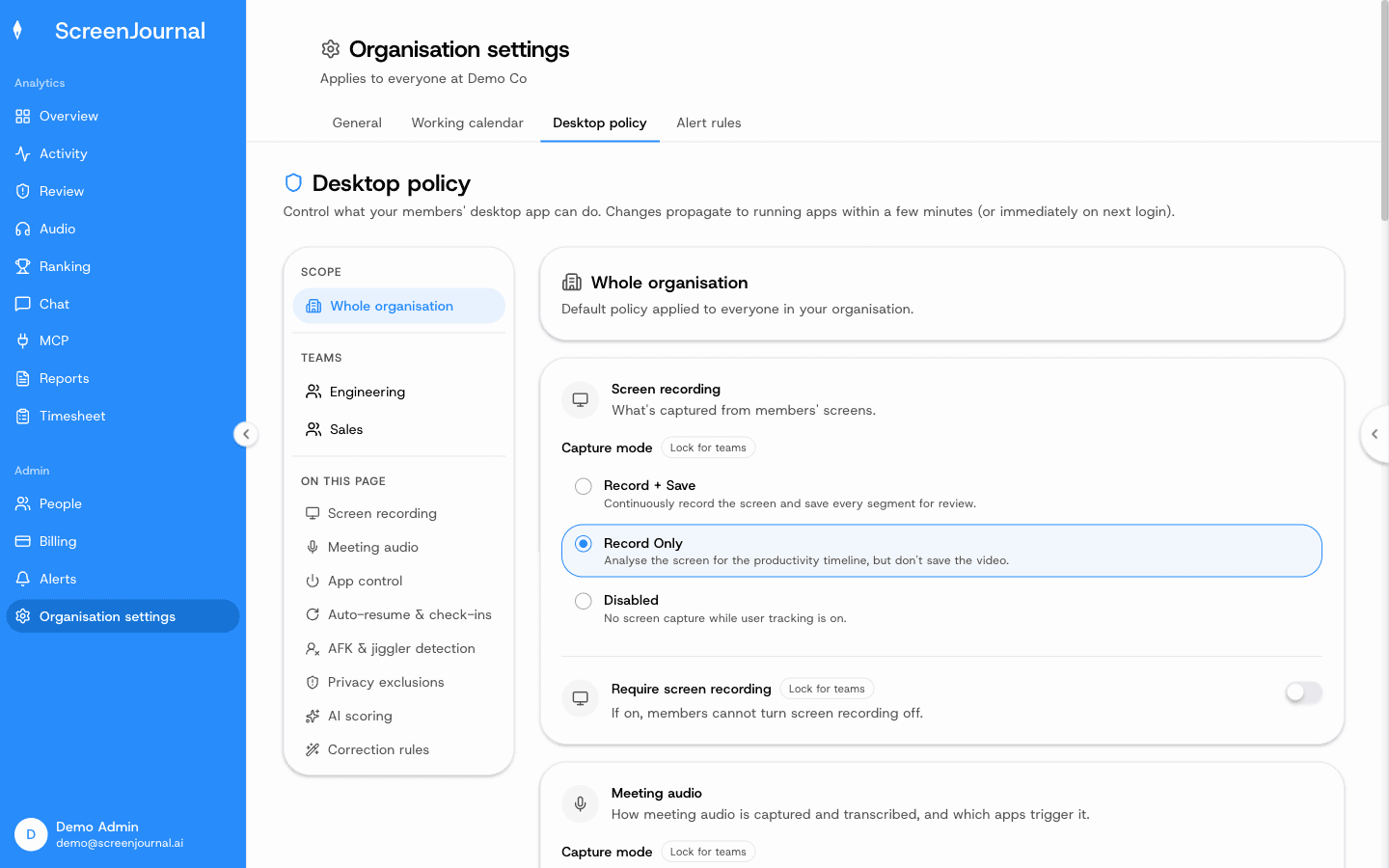
Compliance keeps its teeth. An admin writes plain-language alert rules ("alert if an agent opens YouTube during their call window"), the AI checks them against each agent's activity, the agent explains from their desktop inbox, and a manager approves or rejects the explanation. Evidence clips kept for an alert are exempt from redaction. Proof: Organisation settings → Desktop policy, where capture mode, meeting audio, privacy exclusions and correction rules are set for the organisation or a team.
More on how this works is on the work chronicle page.
Does ScreenJournal record and analyse calls?
Only when the organisation turns it on. Meeting audio is off by default; once enabled, ScreenJournal records and transcribes calls in recognised meeting apps, so a QA reviewer reads what happened on a call on the Audio page alongside what happened on screen. Voice is handled differently from screen data, and it is worth being plain about the difference: derive-and-discard applies to the screen by default, while the policy decides whether call audio is kept alongside its transcript or only the transcript survives.
The Audio page reaches the same people as everything else: an agent's own recordings, their team's for a team manager, the whole organisation for org-wide roles, with search across transcripts. Turning audio on shows a consent notice the admin must accept, the desktop app tells agents at sign-in that calls may be recorded, and the header shows "Recording from" and the app name while a call is being captured. Agents can see, and unless the policy locks it, edit the list of apps that trigger recording; the policy can also require meeting capture. Redacted passages appear as a neutral marker. In two-party consent jurisdictions, voice is offered only to clients who guarantee to ScreenJournal that they obtain employee consent.
When is a screenshot tracker the better choice?
When a client contract explicitly requires stored screenshot evidence, a screenshot tracker satisfies that clause and ScreenJournal does not, because it takes no screenshots (opted-in video evidence is replayable recording, not a capture archive). Tools like Hubstaff and Time Doctor typically capture periodic screenshots for exactly this reason, and Time Doctor in particular has a large BPO customer base. Many contracts specify screenshots only because screenshots were the only proof available when the contract was written, so it is worth asking whether an interpreted, per-entry record would satisfy the client before renewing the clause. The honest comparison is on ScreenJournal vs screenshot trackers.
Frequently asked questions
Does ScreenJournal store screenshots of agents?
No. It takes no screenshots: it reads the screen to understand the work, writes the timeline entry, and by default deletes the raw screen data during processing, so what remains is the derived record: what was done, in which app, for how long, with a score. A manager can opt in to keep video evidence, stored for up to 3 months.
Can a BPO prove work to clients without screenshots?
Yes. Every timeline entry describes what was done, in which app and for how long, and every day on the Timesheet opens into the segments behind it. That is evidence a client can read directly rather than images they must interpret.
Do agents see what supervisors see?
Yes. Agents see the same activity view their managers do, see the same scores, and can redact segments when the organisation allows it.
Does ScreenJournal stop agents faking activity?
Faked activity stops mattering, because activity is not what is measured. ScreenJournal reads what was produced, so a mouse jiggler or input simulator adds nothing to the timeline and nothing to the timesheet.
Does ScreenJournal record agents' calls?
Only when the organisation turns it on; meeting audio is off by default. Once enabled, the desktop app records only while a recognised meeting app is using the microphone, the policy decides whether the audio file is kept or only the transcript, and the Audio page shows transcripts, with search and playback, to the same people who can see that agent's activity, the agent included. Agents can see, and unless the policy locks it, edit the list of apps that trigger recording.
See the work itself, not screenshots of it
Timesheets, reports and answers from the work your team actually did. Available for Windows and macOS, with Linux and mobile support coming soon.